Support

Search Results

  • Product
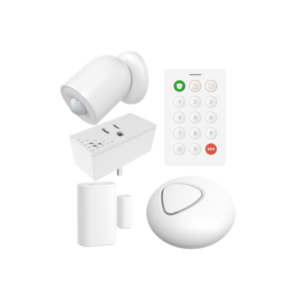
    nami Alarm 15 Starter Kit

    Next-generation security. Professionally monitored.

    The nami Alarm.com Starter Kit is everything you need to protect an apartment, small house, or small business office right out of the box. Built on the industry-leading Alarm.com platform, it combines cutting-edge Wi-Fi sensing with traditional door/window security, self-installed in under 30 minutes, no contractor required.
    Learn about the Agile Security System

    Features:

    • The Pod: the hub of your system, with a built-in siren, Wi-Fi motion sensor, and Wi-Fi hub that anchors the mesh sensing network
    • Wi-Fi Sensor Plug: a smart outlet you can control through the Alarm.com app; together with The Pod forms a Wi-Fi motion sensing zone for small-home/office coverage with fewer blind spots
    • PIR Motion Detector: a traditional motion detector that complements the Wi-Fi motion detection zone to cover edge-cases.
    • Keypad: arm and disarm locally without a phone; always there when you need it
    • Door Sensor: instant detection when a door or window opens
    • Wi-Fi sensing detects motion through walls across entire rooms, with better pet immunity and fewer false alarms than traditional PIR sensors
    • Powered by Alarm.com, the professional platform protecting over 10 million properties worldwide
    • Police, fire, and medical dispatch when an alarm triggers
    • Real-time notifications to your phone for alarms, alerts, and sensor activity
    • Plug-in design. No drilling, no wiring; take it with you when you move

    What’s in the Box

    The Pod ×1 Keypad ×1 Sensor Plug×1 Motion Detector×1 Door Sensor ×1


    1 year warranty

  • Post
    How to Automate Your Pool or Spa Pump with Alarm.com

    Your pool pump is probably the quietest expensive thing you own. It runs in the background, hour after hour, on a mechanical timer bolted to the equipment pad, and most of the time you never think about it until the electric bill arrives or the water turns cloudy. According to the EPA’s ENERGY STAR program […]

  • Post
    Digital Outputs in Home Security and Automation: Dry Contact vs. Open Collector

    If you have spent any time wiring security sensors or home automation devices, you have probably heard the phrase “dry contact.” If you have dug into the installation manual for a Qolsys, DSC, or 2GIG panel, you may have also come across “open collector output” or “PGM output.” Both terms describe a category of electrical […]

  • Post
    Vivint vs. Alarm.com: A 2026 Buyer’s Guide for Homeowners

    A Vivint salesperson knocks on your door. They have a clipboard, a Vivint shirt, and a deal that, conveniently, expires tonight. Maybe they tell you a neighbor down the street just signed up. Maybe they say the installer is already scheduled for Thursday. Maybe they offer to waive the activation fee, but only if you […]

  • Product
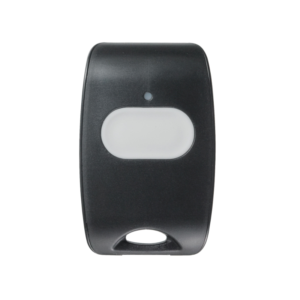
    PowerG Security Panic Key

    Features:

    • Activation via large, easy-to-use button
    • Integrated LED to indicate signal transmission and acknowledgement
    • Water resistant
    • Multifunction clip and neck strap
    • Full 2-second delay on panic button
    • Fully Supervised
    • Dimensions: 53 x 33 x 11mm (2.1 x 1.3 x 0.43in)
    • Prolonged battery life (7 years with typical use)

    Panel Compatibility

    IQ Panel 2+ IQ Panel 4/5 IQ 4*/5 Hub IQ Pro

    * PowerG Radio Required


    1 year warranty

  • Post
    Monitoring an Alarm.com System You Already Have: How To Switch to Surety

    You already own an Alarm.com compatible system, built around a Qolsys IQ or 2GIG panel, and you are shopping for a monitoring and service provider. You do not need new equipment. You need a new dealer. The DIY security community’s answer to which provider to use in this situation is consistent and has been for […]

  • Post
    How Much Does a Home Security System Cost in 2026?

    Home security system pricing varies enormously — from fully self-monitored DIY setups that cost nothing beyond the hardware, to professionally installed systems running $80 or more per month on a locked-in contract. Most people shopping for a system have no clear sense of what a fair price looks like, what’s included at each price point, […]

  • Post
    Alarm.com Key Fobs: Models, Compatibility, and Programming Guide

    A key fob is often the fastest way to interact with your security system. Instead of walking to a panel and typing a code every time you leave or arrive, you press a single button on your keychain and the system responds. For households with children, elderly family members, or anyone who would rather not […]

  • Post
    Why Does My Alarm.com System Keep Going Off? (False Alarm Causes & Fixes)

    Few things are more frustrating than a security system that won’t stop crying wolf. You’re jolted awake at 2 a.m., your phone is blowing up with notifications, and when you check the house — nothing. No intruder, no broken window, no emergency. Just your alarm system going off for no apparent reason. If this sounds […]

  • Post
    Qolsys IQ Panel 4 & 5 Explained: Features, Setup, and Alarm.com Integration

    IQ Panel 4 vs IQ Panel 5: Which Should You Get? If you’re shopping for a new Alarm.com security panel, the Qolsys IQ Panel 5 is the one to get. It runs Android 14 on a Qualcomm DragonWing quad-core processor, includes PowerG+ out of the box, has a 13MP PortraitView camera, and supports Z-Wave Long […]

Choose the plan that’s right for you.

Shop Plans

No products in the cart.