
May 29, 2026
How to Automate Your Pool or Spa Pump with Alarm.com
Your pool pump is probably the quietest expensive thing you own. It runs in the background, hour after hour, on a mechanical timer bolted to the equipment pad, and most of the time you never think about it until the electric bill arrives or the water turns cloudy. According to the EPA’s ENERGY STAR program for pool pumps, that pump can be the second-largest energy user in your entire home, costing as much as $310 per year to run. With more than 8.5 million residential pools in the United States and over 200,000 new ones built each year, that is a lot of households paying for a piece of equipment they cannot see, schedule, or check on without walking outside.
This article is about fixing that. If you already run an Alarm.com security system through Surety Home, you can bring your pool or spa pump into the same app you use to arm the house, watch the cameras, and lock the doors. The tools that make it possible are Z-Wave relays, and the concept builds directly on our earlier guide, Digital Outputs Explained, which covered dry contacts, relays, and which Alarm.com devices use each. Here we take that foundation and turn it into a practical, end-to-end project for the equipment pad.
One thing to settle before anything else: the right approach depends on how your pump is meant to be powered, specifically whether it was designed to be switched off every day or to stay powered all the time. A pump meant to be switched off daily (which includes virtually all single-speed pumps, and some variable speed pumps) can be automated by switching its power with a high-power relay. A pump meant to stay powered continuously (which many, though not all, variable speed pumps are) should not be power-cycled every day; instead you automate its speed. So the deciding factor is the manufacturer’s intended powering, not the pump type by itself. The first step, before you buy or wire anything, is to read your pump’s manual and learn how it is meant to be powered and controlled.
There are two paths to a smarter pool. One is a full dedicated pool automation system from a brand like Pentair, Jandy, or Hayward. The other is a Z-Wave relay layered onto your existing Alarm.com system. The second path costs a fraction of the first and covers most of what homeowners actually want day to day. We will walk through how it works, what hardware it takes, what it saves, and, just as importantly, where its limits are.
Why Automate the Pool Pump?
The case for pool pump automation comes down to two things: energy and ownership experience. The energy story is the bigger one, and it starts with how pumps consume power. A traditional single-speed pump has one gear: full blast. It is usually wired to a mechanical time clock and set to run somewhere between 8 and 12 hours a day at a speed sized for the most demanding job the pool ever needs, such as running a pressure-side cleaner, even though basic filtration needs far less flow. That mismatch wastes energy every single hour the pump runs.
Variable speed pumps (VSPs) changed the math entirely, and the reason is physics. Pump power does not scale linearly with speed; it scales roughly with the cube of speed (an affinity-law relationship). ENERGY STAR puts the practical consequence in plain terms: reducing pump speed by one-half allows the pump to use just one-eighth as much energy. Running longer at a low speed therefore beats running briefly at a high speed, often by a wide margin. That is why ENERGY STAR certified variable speed pumps are third-party certified to use up to 70% less energy than conventional single-speed pumps.
It helps to put real numbers on the cube-law effect. Take a single pump that draws about 1,800 watts at full speed. Running it at full speed for 6 hours a day uses roughly 10.8 kWh daily, or about 3,940 kWh a year. Cut the speed in half and the draw falls to roughly one-eighth, around 225 watts, so running it twice as long, 12 hours, uses only about 2.7 kWh a day, or about 985 kWh a year, while moving the same total amount of water. At the U.S. average residential rate of about 19 cents per kWh (per U.S. Energy Information Administration data for early 2026), that is roughly $750 a year versus about $190, a difference of more than $550 for the same water turnover. This is also why ENERGY STAR’s national estimate of up to $310 a year is only a starting point: a larger single-speed pump running long hours, or a higher local rate (residential prices run from about 12 cents in parts of the Plains to over 40 cents in Hawaii), pushes the cost well above that. Your exact savings depend on your pump, your runtime, and your rate, but the shape of the curve holds everywhere.
Scheduling matters too, independent of pump type. ENERGY STAR notes that cutting filtration time from 24 hours a day down to 6 hours a day reduces that energy use by 75%. The takeaway is that both how fast and how long your pump runs are levers you can pull, and a smart control layer makes pulling them effortless. The ownership-experience side is simpler to describe: instead of squatting at the equipment pad turning dials on a time clock, you adjust everything from your phone, get alerts when something is off, and never again drive home from vacation wondering whether you left the pump running.
How Alarm.com Enables Pool Automation
Here is the honest starting point: Alarm.com does not have a native, deep integration with Pentair, Jandy/Zodiac, or Hayward control systems. There is no “pool mode” in the app that speaks directly to a Pentair IntelliCenter. So the practical way to bring a pool pump into Alarm.com is the approach from the digital outputs guide: a high-power Z-Wave dry-contact relay acts as a smart master switch for the pump or its control circuit.
A Z-Wave relay receives commands from your Alarm.com panel and either switches a circuit on and off or closes a dry contact as a signal. It shows up in the app as a standard switch, which means it can be used in automation rules, scenes, and schedules, and it can be triggered by your system’s arming status or folded into whole-home scenes. How you put that capability to work, though, depends entirely on which kind of pump you have, so it is worth taking the two cases separately.
If Your Pump Is Meant to Be Switched Off Daily
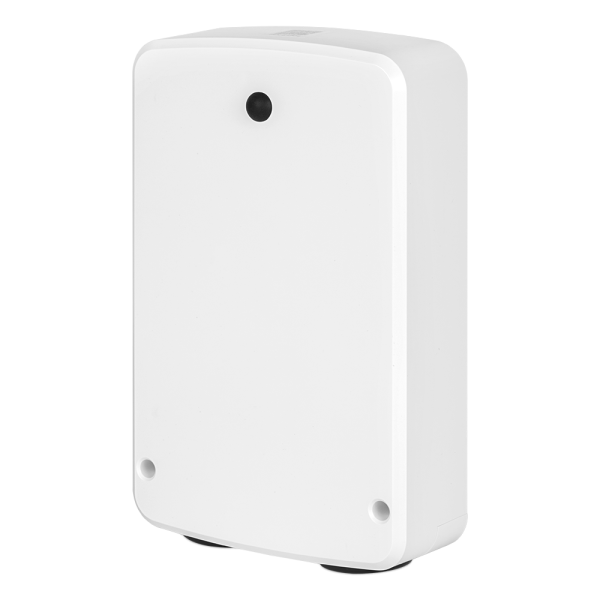
Most single-speed pumps, and some variable speed pumps, are designed to be shut off when they are not needed, the same way the mechanical time clock on your equipment pad already switches the pump off every day. If your pump is in this group, replacing that time clock with a smart relay is the ideal upgrade, and switching the pump’s power on and off daily is no problem at all, because that is the duty both the pump and the relay are built for. The recommended hardware is the Zooz ZEN78 High Power Relay, which is rated for up to 40A at 120/240V, includes real-time energy monitoring, and supports Z-Wave Long Range. Zooz markets it explicitly for pool equipment, EV chargers, and heated driveways, and community members have confirmed it working with the Qolsys IQ Panel 4 and Alarm.com on the Surety community’s Z-Wave compatibility list. The key is to confirm in your pump’s manual that it is meant to be powered down between runs. If it is, the ZEN78 becomes a schedulable, remotely controllable on/off switch, and that holds whether the pump is single-speed or a variable speed model designed to be switched off.
If Your Pump Is Meant to Stay Powered
Many variable speed pumps are designed to stay energized continuously and to manage their own speed and schedule internally. If your pump is one of these, you generally should not use a relay to cut and restore its power on a daily basis. A VSP like this has onboard drive electronics and its own clock, and hard power-cycling it every day stresses the drive’s capacitors and the relay contacts and fights the pump’s own programming and soft-start logic. Instead, power it the way its manual specifies (leaving it energized all the time, if that is the intent), and automate its operation by changing its speed rather than by switching its power. The way to do that from Alarm.com is to drive the pump’s preset speed inputs with a multi-relay, which the next section covers in detail.
That does not mean a high-power relay has no place on an always-on VSP. In fact, adding a ZEN78 alongside the multi-relay is still well worth it, you just do not use it to cycle the pump daily. Two benefits make it worthwhile. First, it gives you a convenient remote kill switch: when you do need the pump fully off, for an extended vacation, a repair, a service visit, or an emergency, you can cut power from the app or from anywhere instead of walking out to the breaker, then restore it just as easily. Second, the ZEN78’s built-in energy monitoring reports the pump’s real-time power draw right in the Alarm.com app, so you can confirm at a glance that the pump is running and even notice when something is off, such as a clogged filter showing up as a higher-than-normal amp reading. You leave the relay on for normal operation and let the multi-relay handle the day-to-day speed automation, while the ZEN78 stands by for the occasional shutoff and quietly meters the pump’s energy use the rest of the time.
The mental model to hold onto is simple: let the pump be powered the way it was designed to be. If it is meant to be switched off daily, let the ZEN78 switch it on a schedule. If it is meant to stay powered, leave it powered and use Alarm.com to select among its preset speeds, to provide occasional remote overrides, and to monitor it. Reading your pump’s manual is what tells you which camp you are in, and it is the single most important step before you automate anything.
Going Beyond On/Off: Preset Speed Selection with a Multi-Relay
For a variable speed pump that is meant to stay powered, this is the approach to reach for, because it lets you automate the pump by changing its speed rather than by cutting its power. Many VSPs expose dry-contact (relay) digital inputs that select among speeds you have pre-programmed on the pump itself. This is different from full RS-485 communication, which sets any speed on the fly. With relay-input speed selection, you program a handful of speeds in the pump’s own menu, then close one relay contact or another to tell the pump which preset to run. That means you can automate a few useful speeds, a low overnight circulation speed, a medium daytime filtration speed, and a high speed for cleaning, skimming, or running spa jets, all from Alarm.com, while the pump stays powered the whole time the way it is meant to be.
To do this you use a multi-channel relay instead of a single one. The Zooz ZEN16 MultiRelay is the natural fit. It provides three independent dry-contact outputs (rated 20A, 15A, and 15A), works with low-voltage or 240V loads, and is now offered in an 800LR (Z-Wave Long Range) version for reliable range out at the pad. Each of the three channels appears in Alarm.com as its own switch, so you can drop each speed preset into its own scene, schedule, or rule. The ZEN16 has also been tested with the Qolsys IQ Panel 4 and Alarm.com by members of the Surety community.
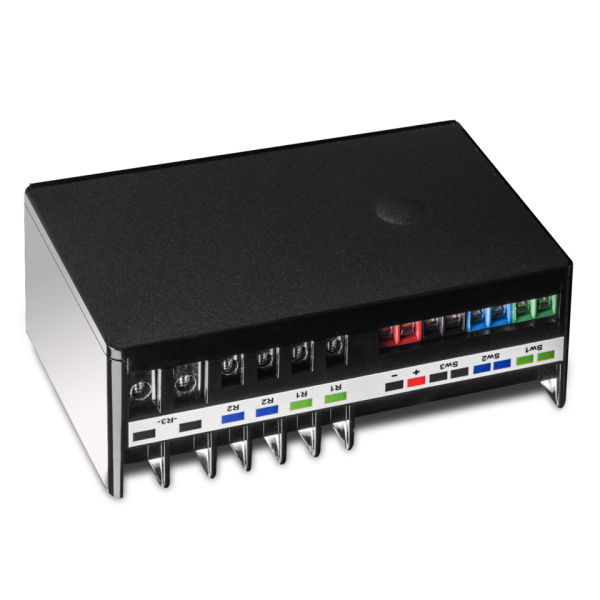
It is worth being clear about how the multi-relay relates to the high-power relay on a VSP. The pump’s speed-select terminals are low-voltage signal inputs, so the ZEN16’s job is signaling, not power switching: each channel simply closes a dry contact to tell the pump which preset to run. You would not run the pump’s motor power through the ZEN16, and you would not use it to cut motor power either; even though one of its channels is rated up to 20A, it is there to send speed signals, not to switch the load. On a VSP, the ZEN16 doing speed selection is the core of the automation, and the pump simply stays powered. A ZEN78 is optional in this setup: if you add one, it is not cycled daily but left on, serving as a remote shutoff for the occasional vacation or repair while the ZEN16 handles day-to-day operation. It can also report the pump’s power draw in the app for a quick health check.
At a high level, each relay channel wires to one of the pump’s speed-select input terminals. Closing channel one calls the low preset, channel two the medium preset, and channel three the high preset, though the exact wiring and the number of inputs depend on your specific pump. The pump still owns the actual speed values; the relay only selects which pre-programmed speed is active. This gives you a few discrete speeds, not arbitrary on-the-fly control of any speed.
Only one speed should ever be active at a time. Closing two speed inputs at once can confuse the pump and cause unpredictable behavior. The ZEN16 has a built-in protection for exactly this, called DC Motor Mode. When enabled, the device automatically turns the other relays off before it activates one, so the outputs are mutually exclusive at the hardware level regardless of where the command came from. According to Zooz’s ZEN16 advanced settings documentation, this is Parameter 24: setting it to 1 interlocks relays 1 and 2 (a two-speed setup), and setting it to 2 interlocks all three relays (the typical three-speed pool setup). The default is 0 (disabled), so you have to turn it on deliberately.
Two practical notes go with that feature. First, changing an advanced parameter like this requires access to the device’s Z-Wave configuration. Good news: if you have a Qolsys IQ Panel 4 or IQ Panel 5 on software version 4.5 or higher, you can set Z-Wave parameters directly from the panel, so you do not need a separate hub. See our step-by-step guide, How To Set Z-Wave Device Parameters with IQ Panel, and set Parameter 24 to 2 for a three-speed setup (this is an advanced feature, so follow the guide carefully). If your panel is on an earlier software version or you would rather use another controller, you can instead configure the parameter on a hub that exposes Z-Wave parameters and then move the device to your panel, since the setting lives in the relay’s own memory. Two easy options are the Zooz Z-Box Hub, which surfaces every parameter on Zooz devices natively, and a Hubitat Elevation hub, an inexpensive local hub that Zooz publishes ZEN16 instructions for. Either way, make sure the relay is on recent firmware first (DC Motor Mode was added in a later revision), test that the outputs actually interlock before wiring to the pump, and treat the interlock as a documented capability to confirm for your specific setup with Surety Home rather than something to assume. Second, even with the interlock enabled, build your Alarm.com scenes and rules so they only ever call one speed at a time. The hardware protection and the disciplined automation work together.
Support for relay-input speed selection varies by manufacturer and even by model revision, so treat the following as examples to verify against your pump’s installation manual rather than guarantees. Hayward has some of the clearest support: the Hayward LifeStar VS explicitly offers External Relay Speed Control, where relay contacts on its inputs (commonly labeled INP1 through INP3) select speeds programmed in the pump’s timer menu after you set the pump to relay-control mode via its DIP switches, and several TriStar VS, Super Pump VS, and MaxFlo VS models support relay or digital-input speed selection as well. Value-brand pumps such as Black+Decker, CircuPool, Calimar, and Blue Torrent frequently support relay control through a variable speed automation adapter: you set the speeds on the pump’s panel, then wire relays to trigger up to three presets. Pentair generally favors RS-485 for full control, and while some IntelliFlo models offer an I/O relay control board, inbound relay-based preset selection is more limited than Hayward’s. Jandy/Zodiac support for simple relay preset inputs is also limited, with most Jandy VS pumps relying on their own SpeedSet controller or RS-485 instead.
Two caveats are worth stating plainly. Relay inputs select only your pre-set speeds, not any speed on demand, and you typically need one relay channel per speed input, with the pump set to relay or external-control mode. For fully dynamic speed control across the pump’s whole range, a dedicated automation system communicating over RS-485 is still required. Because this work involves both high-voltage wiring and pump programming, use a qualified electrician and a pool professional and confirm the wiring against your pump’s manual before you start.
Here is how the two recommended relays compare for pool duty, so you can match the hardware to what you actually want to control.
| Relay | Outputs | Rating | Best for |
|---|---|---|---|
| Zooz ZEN78 High Power Relay | 1 dry contact | 40A, 120/240V, with energy monitoring | Daily on/off for a single-speed pump; occasional remote shutoff and power monitoring on a VSP |
| Zooz ZEN16 MultiRelay (800LR) | 3 dry contacts | 20A / 15A / 15A, low-voltage or 240V | Selecting a few preset speeds on pumps with relay speed inputs |
A note on these recommendations: we have no financial relationship with Zooz and do not earn commissions from recommending their products. We recommend the ZEN78 and ZEN16 because they have proven reliable for Alarm.com integrations in our experience, and because they offer the right combination of high-power handling, Z-Wave Long Range support, and dry-contact outputs needed for pool pump control.
Energy-Saving Use Cases
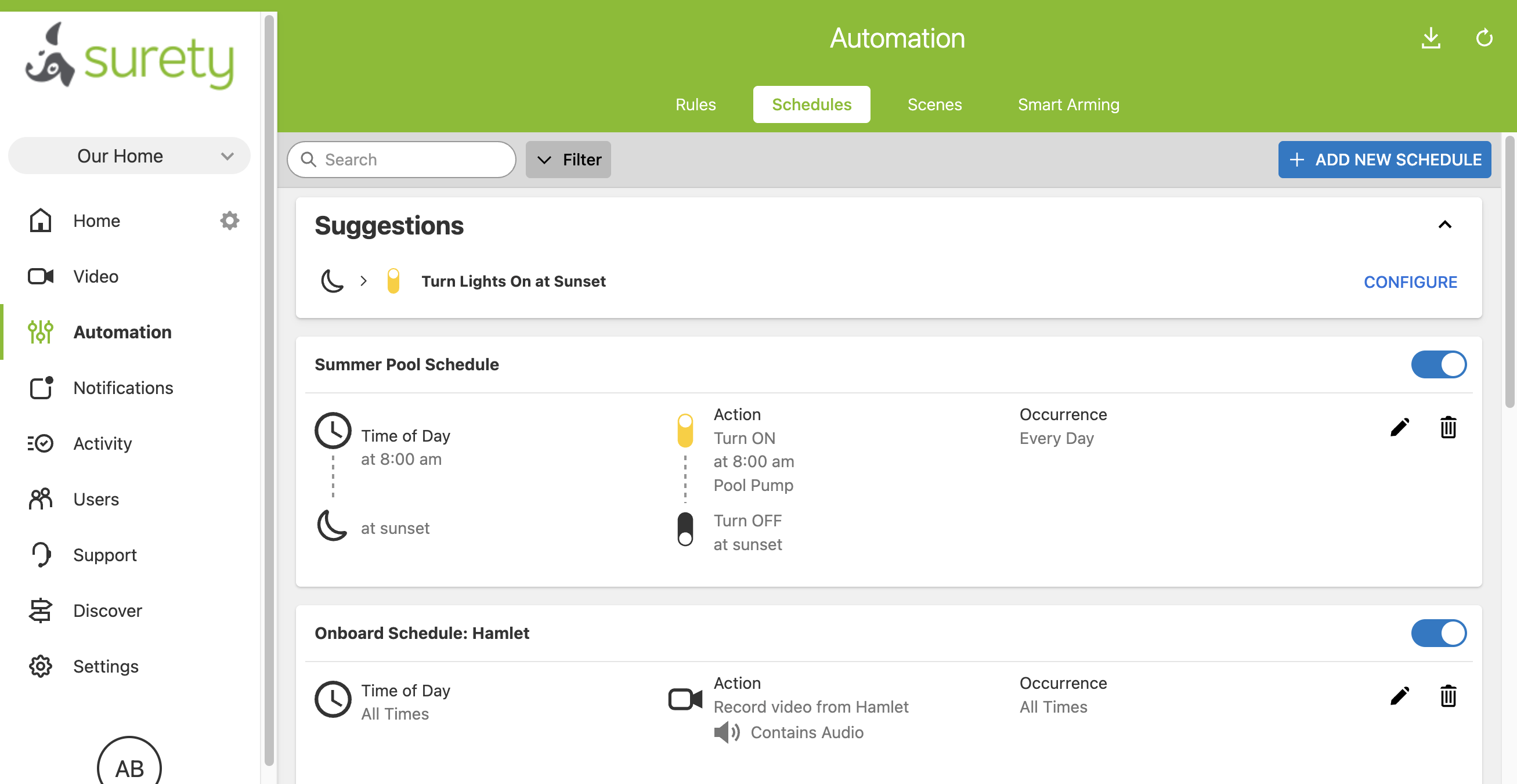
Once the relay is in place and the pump shows up in your app, a handful of automations do the real work. The first is off-peak scheduling. If your utility charges time-of-use rates, you can shift consumption to the cheaper overnight or midday windows directly in Alarm.com without touching the equipment pad. On a single-speed pump that means scheduling the pump on and off; on a VSP it means scheduling a switch between speed presets so the pump keeps circulating but drops to a lower, cheaper speed during peak hours. The second is seasonal adjustment: dial runtime or speed up in the heat of summer and back down in the cooler months from the app, instead of crouching to reprogram a mechanical time clock every few months.
Occupancy and arming-aware rules add another layer. You can build a rule that reduces runtime or pauses non-essential cycles when the system is armed Away or when the family leaves for an extended trip, then restores the normal schedule when you return. The ZEN78’s power monitoring adds a different kind of value: visibility. Because the relay reports real watts and amps in the app, you can open Alarm.com and confirm at a glance that the pump is drawing the power you expect, and a clogged filter or failing bearing often shows up as a higher-than-normal amp reading. One important caveat sets expectations correctly here: Alarm.com cannot trigger an automatic rule or notification based on a measured power value, so this is a manual check rather than a hands-off alert. If you want the system to actively tell you whether the pump is running, you add a dedicated run-status sensor, which the next section covers. Finally, there is the simple maintenance case: one tap kills power for backwashing, cleaning the skimmer basket, or a service visit, and one tap brings it back.
Confirming the Pump Is Actually Running
Scheduling and switching the pump is only half of an automation you can trust. The other half is knowing it actually did what you told it to. As noted above, the relay’s power figure is something you read in the app, not something Alarm.com can alert on, and most pool pumps do not provide a simple run-status output you can wire into a security system. Residential pumps from Pentair, Hayward, and Jandy generally report whether they are running, and at what speed, over RS-485 to a compatible pool controller, not as a dry contact a panel can watch. So to get a true “the pump is running” signal into Alarm.com, you add a small dedicated sensor.
The idea is the mirror image of the relay. Where the relay is a dry-contact output that Alarm.com switches, a run-status sensor is a dry-contact input that Alarm.com monitors. One detail matters here: Alarm.com cannot read the input terminals on a Z-Wave relay like the ZEN16 as a sensor, so the run-status switch needs to land on a real sensor zone. That means wiring the sensor’s dry contact either to a hardwired zone (on a panel or a hardwire zone expander that supports wired sensors) or to a wireless sensor that has an external contact input, after which it appears in the app as an open or closed sensor you can build notifications and rules around. This is the same dry-contact concept from the digital outputs guide, just used as an input rather than an output.
| Sensor | How it works | Strengths | Tradeoffs |
|---|---|---|---|
| Current-sensing switch (CT) | Clamps around a motor power wire and closes a contact when current is flowing | Non-invasive, no plumbing, confirms power is reaching the motor | Confirms power, not water flow; needs a monitored input to report |
| Flow switch | A paddle in the plumbing detects actual water movement | Most reliable; catches air locks and closed valves a current sensor would miss | Usually requires a plumber to tee into the pipe |
| Vibration sensor | Mounts on the motor housing and detects the motor running | Easy to add, no plumbing or electrical work | Can be fooled by other vibration; best as a backup |
| Pressure sensor | Detects a pressure change in the lines when the pump runs | Another way to infer the pump is working | More complex to set up; situational |
For most homeowners the easiest win is a current-sensing switch: a CT clamp around one of the motor’s hot wires closes a contact whenever current flows, so it confirms power is actually reaching the motor and it installs without touching the plumbing. The most reliable confirmation is a flow switch, a paddle-style switch teed into the pipe that detects real water movement, because it is the only option here that catches an air lock or a closed valve where the motor is energized but no water is moving (it usually takes a plumber to install). A vibration sensor on the motor housing makes a reasonable backup, and a pressure sensor is a more situational choice. Whichever you choose, the payoff is the same: pair it with a schedule that says so that if the pump should be on but the sensor reads off, Alarm.com sends you a notification. That is the difference between an automation you hope is working and one you know is working.
Convenience and Scenes
Beyond raw savings, the day-to-day convenience is what makes pool automation stick. Scenes let you bundle pool actions with the rest of your smart home. A “Spa Ready” scene can turn on the spa pump or heater circuit ahead of time so the water is warm by the time everyone is ready, with no trip outside to flip a switch. A “Pool Day” or “Boost” scene can ensure circulation and features are on for a crowd, and if you have wired a higher-speed preset to a relay channel, it can call that faster speed too (otherwise, speed remains the VSP’s job).
A “Vacation Mode” scene can drop the pump to the minimum runtime needed to keep the water healthy while you are away, and a “Return Home” scene can restore your normal schedule the day you get back. Underneath all of it is the single biggest convenience: one app for both security and pool. You get remote on/off and status from anywhere, plus rules that can tie the pool to your arming status, the time of day, or other sensors in the home. There is no separate pool app to open and no separate login to remember.
To make that concrete, picture a family in Arizona with an older pump on a mechanical timer who travel for two or three weeks at a stretch each summer. Before automating, they had two bad options: leave the pump on its usual schedule and pay to filter a pool nobody was swimming in, or shut it off at the pad and come home to green water. With a ZEN78 and Alarm.com, they switch to a “Vacation Mode” schedule that trims runtime to the minimum the water needs, arm the system Away, and head to the airport. A flow sensor wired into the system would notify them if the pump ever stopped while they were gone, and one tap restores the normal schedule the day before they fly back. The pool stays clear, the summer bill drops, and no one has to ask a neighbor to walk out to the equipment pad.
Shouldn’t I Just Run a VSP 24/7 at Low Speed?
This is a fair question, and the honest answer is that running a variable speed pump at a low speed for long stretches, often close to continuously, is frequently the most efficient and water-friendly way to operate. The cube-law math rewards low and slow, and continuous low-speed circulation tends to filter better and put less strain on the plumbing than short high-speed bursts. If that is your baseline, you are already doing the most important thing right. So why add Alarm.com control at all?
Because a smart control layer adds value even on top of a mostly-continuous low-speed schedule. Real life requires adjustments: a hot week, a heavy pool party, a storm that dumps debris, or a fresh dose of chemicals can all justify temporarily changing runtime, and doing that from your phone beats walking to the pad. Remote shutoff is genuinely useful for maintenance, service appointments, and vacations. Smart-home integration lets the pool respond to Away mode and return-home scenes and participate in the same logic as the rest of your devices. And if you have added a run-status sensor, the system keeps watch even when the pump is almost always on, so a stoppage or a loss of flow surfaces as an alert rather than as a surprise the next time you look at the water. All of this flexibility comes without giving up the efficiency of low-speed operation.
The recommended approach, then, is to program the variable speed pump itself for mostly continuous low-speed operation, leave it powered the way its manual intends, and use Alarm.com to select among its preset speeds, to monitor it, and to provide occasional remote overrides. Notice what that does not include: switching the pump’s power on and off every day. A VSP designed to run continuously is built to manage its own speed and to stay running, and daily power cycling works against both its electronics and its programming. Let the pump do what it does best, change its speed rather than its power for routine automation, and reserve the relay’s ability to cut power for the rare times you actually need everything off. (If instead your VSP’s manual says it is meant to be shut off when idle, then power switching is perfectly fine, the same as for a single-speed pump.)
Relay Approach vs. Dedicated Pool Automation Systems
It is worth being clear about what the relay approach is not. A full dedicated pool automation system, such as Pentair IntelliCenter, Jandy/Zodiac AquaLink and iAquaLink, or Hayward OmniLogic, offers much deeper control than a relay ever will. These systems can drive a pump’s full speed profile, operate automated valve actuators for pool/spa changeover, run water features and pool lighting, integrate with heaters, and in some cases manage chemistry. If you have a complex pool with a spa, multiple valves, water features, and a heater you want fully orchestrated, a dedicated system is the right tool. That capability has a price: equipment commonly runs in the $1,500 to $4,000 or more range, and a professionally installed system commonly totals $2,500 to $7,500 or more, sometimes higher depending on the pool’s complexity. Treat those as approximate market ranges that vary by region and configuration, not fixed quotes.
The Alarm.com relay approach lives at the other end of the cost spectrum. For simple on/off pump control, the total including a basic install often comes in under roughly $500, and it uses the app you already have. It is excellent for on/off control, scheduling, remote access, scenes, and power monitoring, and with a multi-relay it can add a few preset speeds on pumps that support relay inputs. What it does not do is drive valve actuators, run full chemistry automation, or give you continuous speed control across the pump’s entire range. It is at its best layered on a properly programmed VSP.
| Capability | Alarm.com + Z-Wave Relay | Dedicated Pool Automation System |
|---|---|---|
| App control and remote access | Yes (same Alarm.com app) | Yes (separate pool app) |
| Scheduling | Yes | Yes |
| Automation rules and scenes | Yes (with whole-home devices) | Yes (pool devices only) |
| Power and energy monitoring | Yes (ZEN78) | Varies by system |
| On/off control | Yes (ZEN78) | Yes |
| Preset speed selection | Yes (ZEN16, on pumps with relay inputs) | Yes |
| Full continuous variable speed (any RPM) | No | Yes (RS-485) |
| Automated valves (pool/spa) | No | Yes |
| Water features and pool lighting | Limited (extra relays) | Yes |
| Chemistry automation | No | Yes (on equipped systems) |
| Uses your existing security app | Yes | No |
| Typical total cost | Often under ~$500 (basic on/off) | ~$2,500 to $7,500+ installed |
The practical recommendation: many homeowners get most of the everyday convenience and energy management they actually want at a fraction of the cost with the Alarm.com relay method, especially on a single-pump pool. If you have a complex multi-feature pool or you specifically want automated valves and chemistry, a dedicated system will serve you better. If you are unsure, it is reasonable to get quotes for both and compare.
Getting Started and Installation Tips
Start with the safety reality: pool equipment runs on high voltage and is governed by electrical and pool codes. The high-voltage wiring is a job for a qualified electrician, and any pump or plumbing programming should involve a pool professional. This is not a place to improvise. With that established, the preferred hardware is the Zooz ZEN78 (or a comparable high-power Z-Wave relay), mounted inside a properly rated enclosure at the equipment pad, because the relay modules themselves are not rated for outdoor exposure.
For larger pumps, or simply to be conservative about motor inrush current and longevity, have the relay switch the coil of a properly rated contactor (a motor relay) and let the contactor switch the actual pump power, rather than running the full motor load through the relay contacts. Many equipment pads already have a contactor and an Intermatic-style mechanical time clock, and a clean install often replaces or supplements that timer with the smart relay. We recommend enrolling the relay in Z-Wave Long Range regardless of distance, because it is simply more reliable than standard Z-Wave mesh, and it matters even more when the pad sits far from your panel, behind walls, or in a detached location. To get Long Range, enroll the relay using Smart Start (the QR code or DSK on the device) rather than traditional inclusion, which keeps it on the standard mesh, a detail covered in the digital outputs guide.
Before you decide how to wire and program any of this, read your pump’s manual to confirm how it is meant to be powered, because that determines the right setup. If your pump is meant to be switched off when idle (most single-speed pumps, and some VSPs), scheduling daily on/off with the ZEN78 is exactly right. If your pump is meant to stay powered (many VSPs), do not schedule daily power cycling: leave it powered as the manual specifies, automate it through its preset speed inputs with a multi-relay, and reserve a high-power relay for occasional remote shutoff. After install, test the relay, the schedule, and the monitoring, and confirm the pump actually responds as expected before you rely on any automation.
Limitations and Realistic Expectations
To keep expectations grounded, here is what this approach will and will not do. A single high-power relay gives you on/off control, which suits any pump meant to be switched off daily but is not the way to run a pump meant to stay powered, since such a pump should not be power-cycled daily and is better automated through its speed inputs. A multi-relay like the ZEN16 can select among a few pre-programmed preset speeds on pumps that expose relay speed inputs, but it cannot set arbitrary speeds on demand; fully dynamic, continuous speed control is the job of the pump’s own programming or a dedicated RS-485 system. Alarm.com cannot trigger rules or notifications from the relay’s measured power values; that reading is for viewing in the app, so automatic “is the pump running?” alerts require a dedicated sensor (a flow switch, a current-sensing switch, or a vibration sensor) wired to a monitored input. The relay is not a replacement for full chemistry automation or complex multi-valve control. And it is worth repeating that no native Pentair, Jandy, or Hayward integration exists in Alarm.com; the relay is a master-switch approach, not a protocol-level integration. The best results come from combining the pump’s own VSP programming with Alarm.com’s orchestration, and professional installation is strongly recommended for the high-voltage work.
Frequently Asked Questions
Can Alarm.com control my pool pump’s speed? Partly. With a single relay you get on/off control, scheduling, and monitoring. If your pump supports relay speed inputs (many Hayward models, and value-brand pumps with a speed adapter), a multi-channel relay like the Zooz ZEN16 can select among a few speeds you pre-program on the pump, so you can automate, say, a low overnight speed and a higher daytime speed. Fully variable speed on demand is set on the pump itself or through a dedicated RS-485 system.
Should I use a relay to turn my variable speed pump on and off every day? It depends on how your pump is meant to be powered, so check its manual. Many variable speed pumps are designed to stay powered continuously and to manage their own speed; for those, daily power-cycling is not recommended, because it stresses the drive electronics and the relay contacts and works against the pump’s own programming. Power that kind of pump the way its manual specifies, automate it through its preset speed inputs with a multi-relay like the ZEN16, and use a high-power relay only for occasional remote shutoff (a vacation or a repair). But if your variable speed pump’s manual says it is meant to be switched off when not in use, then automating it with power switching is perfectly fine, the same as it is for a single-speed pump.
What is the difference between the ZEN78 and the ZEN16 for a pool pump? The ZEN78 is a single high-power relay (40A, 120/240V) with energy monitoring. It is ideal for daily on/off control of any pump meant to be switched off daily (most single-speed pumps and some VSPs), and on a continuously powered VSP it serves as an occasional remote shutoff rather than a daily switch. The ZEN16 MultiRelay has three independent dry-contact outputs and is the better choice for a VSP that stays powered, since it drives the pump’s relay speed-select inputs to automate a few preset speeds without cutting power. Both show up in Alarm.com and work in rules, scenes, and schedules.
Does Alarm.com integrate directly with Pentair, Jandy, or Hayward? No. There is no native integration. The relay approach treats the pump or its control circuit as a smart switch. For deep control of valves, water features, and chemistry, a dedicated pool automation system is the right tool.
Will this actually save me money? Most of the big energy savings come from running an efficient variable speed pump at low speed; ENERGY STAR notes that halving the speed uses about one-eighth the energy, and certified variable speed pumps use up to 70% less energy than single-speed pumps. Alarm.com adds savings on top through smarter scheduling, off-peak shifting, and monitoring that catches waste.
How do I get an alert if my pool pump stops running? Alarm.com cannot send a notification based on the relay’s power reading alone; that figure is for checking manually in the app. For automatic alerts, add a dedicated run-status sensor and wire its dry-contact output to a monitored input on your system. A flow switch in the plumbing is the most reliable because it confirms water is actually moving, a current-sensing switch on the motor wire is the easiest to add because it needs no plumbing, and a vibration sensor on the motor housing makes a decent backup. Once the sensor reports to Alarm.com, you can set a rule to notify you when the pump should be running but the sensor reads off.
Can I automate the pump, or only control it manually? A Z-Wave relay shows up in Alarm.com as a switch and works in automation rules, scenes, and schedules, so you can fully automate it: run it on a daily schedule, trigger it from your arming status, and add it to scenes.
Do I need an electrician? For the high-voltage wiring, yes. Pool equipment involves line voltage and is governed by electrical and pool codes, so hire a qualified electrician for the power side. The Z-Wave enrollment and app setup are straightforward once the wiring is done.
