
June 5, 2026
How to Automate Landscape Lighting with Alarm.com
Good landscape lighting does two jobs at once. It makes a house look its best after dark, washing the facade, lining the walkway, and lifting a few trees out of the shadows, and it quietly improves security by removing the dark corners that intruders prefer. The one thing most landscape lighting cannot do is talk to the rest of your smart home. It runs on a photocell or a basic mechanical timer bolted to the transformer, doing the same thing every night whether you are home, away, or asleep, and you cannot check it or change it without walking out to the equipment.
This guide is about closing that gap. If you already run an Alarm.com security system through Surety Home, you can bring your low-voltage landscape lighting into the same app you use to arm the house, watch the cameras, and lock the doors. The tool that makes it possible is a Z-Wave relay, and the idea builds directly on our earlier guide, Digital Outputs Explained, which covered dry contacts and relays and how Alarm.com uses them. It is the same playbook we applied to pool equipment in How to Automate Your Pool or Spa Pump with Alarm.com, now pointed at a different load in the yard.
Alarm.com has no native “landscape lighting” controller, no built-in integration with the big landscape brands. What it does have is excellent support for Z-Wave switches, schedules, scenes, and rules. So the practical path is to put a small Z-Wave relay on your existing low-voltage system and let it show up in the app as a switch. From there you get multi-zone control, automatic dusk-to-dawn or fixed-time schedules, and tie-ins to your security system, all without a separate proprietary app. We will walk through how it works, what hardware it takes, the automations worth setting up, and where the limits are, especially around dimming.
How Low-Voltage Landscape Lighting Works
Almost every permanent residential landscape lighting system is low voltage, and understanding the basic layout is what makes the wiring make sense. At the heart of it sits a transformer, typically taking 120V household power in and putting 12V or 24V out. It is usually mounted on an exterior wall near an outlet, or hardwired to a junction box. From the transformer, buried low-voltage cable runs out into the yard to the individual fixtures: path lights along the walk, spotlights and uplights on the facade and trees, well lights, and accent fixtures in the beds.
Larger systems are often split into zones, with separate cable runs or transformer taps feeding different areas, for example the front path on one run, the facade uplights on another, and the back garden accents on a third. That zoning is exactly what makes independent smart control interesting, because it lets you treat each area separately. And critically, almost all of these systems are built around simple on and off operation, which is precisely what a relay does. This is the same low-voltage dry-contact concept from the digital outputs guide, applied to lighting instead of a security circuit.
The Relay Approach: Multi-Zone Control with a Z-Wave Relay
There are two levels of control to think about, and it helps to keep them separate. The first is zone control, switching each lighting zone independently. The second is master control, turning the whole system on and off at the transformer’s power source. Most of this article is about zone control, because that is where the relay approach shines, but we will cover both.
For zone control, a Z-Wave dry-contact relay is wired on the low-voltage side of the system, after the transformer, so it can switch each zone on and off. The natural fit is the Zooz ZEN16 MultiRelay, which packs three independent dry-contact relays into one small module and can be powered from the transformer’s own 12 to 24 V output (or a USB-C supply). Zooz publishes a step-by-step guide, How to Use the ZEN16 MultiRelay with Landscape Lights, that walks through wiring each zone through one of the relay channels. Members of the Surety community have also confirmed the ZEN16 working with the Qolsys IQ Panel and Alarm.com on the community Z-Wave compatibility list.
One ZEN16 controls up to three zones independently. After you enroll it, Alarm.com shows a separate light switch for each relay, one switch per zone, and each one can be scheduled and automated on its own. Unlike some standalone Z-Wave hubs that expose a single “master” device to toggle all the relays at once, Alarm.com lists only the individual relay switches. To turn every zone on or off together, you simply build an Alarm.com scene or rule that includes all of them, which takes a minute to set up and works exactly the same in daily use. If you have more than three zones, you add another ZEN16 (or another relay) for the additional zones. If you only have one or two zones, a smaller relay may be a better fit, which we cover in the next section.
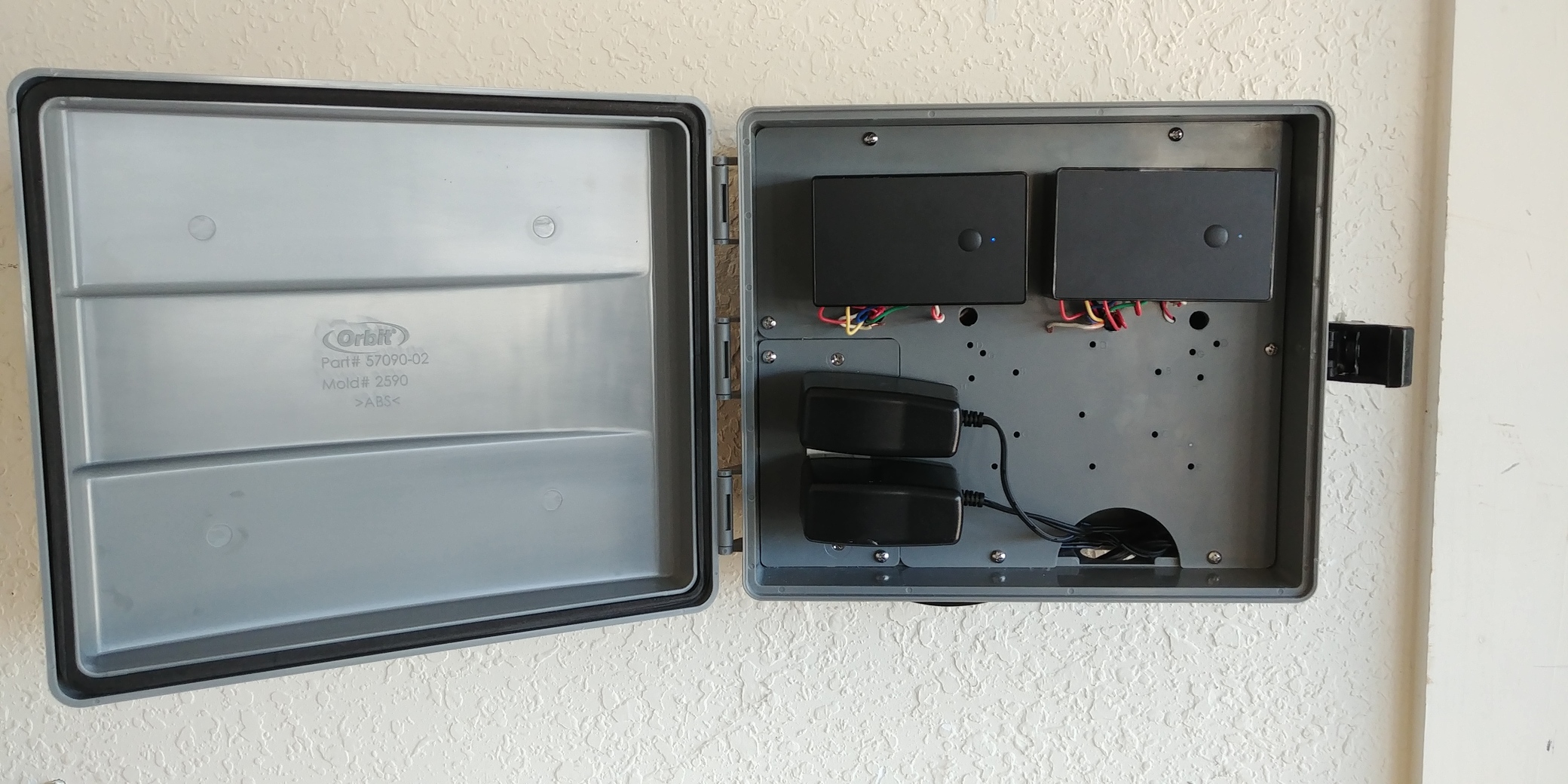
The relay mounts wherever your transformer lives, since that is where it draws power and taps into the zone wiring. Many transformers hang on an exterior wall near a GFCI outlet, but plenty sit in a garage, basement, shed, or pool equipment room, especially on larger or professionally installed systems. If the transformer is indoors, the relay simply mounts there in that dry, protected space, no weatherproofing required. If the transformer is outdoors, mount the relay hidden inside the transformer’s own enclosure or a separate weatherproof, rated junction box, since these relay modules are not rated for raw outdoor exposure and must be kept dry. One sizing note worth checking before you start: the relay itself draws almost no power, but make sure the transformer’s wattage rating can still power all of the connected fixtures. That is a normal landscape-lighting calculation that the relay does not change, and Zooz’s guide recommends totaling your fixture wattage and confirming the transformer can handle it.
On safety, the low-voltage side of the system is genuinely DIY-friendly for a confident homeowner. Anything on the 120V side, such as the transformer’s line feed or a junction box, is line voltage and should be handled by a qualified electrician. When in doubt, wire the relay on the low-voltage side and leave the line-voltage work to a pro.
Master Control: Choose by How the Transformer Is Powered
If you do not need independent zones and only want to turn the whole system on and off, you control the transformer at its power source, and the right device depends on how that transformer is powered. If the transformer plugs into an outdoor wall outlet, the simplest option is not a relay at all: use a Zooz ZEN05 Outdoor Smart Plug, plug the transformer into it, and schedule the whole system from Alarm.com with no wiring. The ZEN05 is IP65 weatherproof and ETL certified, and it fully works with Alarm.com, so it gets all the same scheduling (including sunset/sunrise), scenes, and rules Alarm.com provides for any switch. Just confirm your transformer’s wattage is within the plug’s load ratings (960W incandescent, 15A resistive), since a very large transformer could exceed them.
If the transformer is hardwired into a junction box, there is no plug to use, so you switch the 120V feed to the transformer with a relay rated for line voltage. The Zooz ZEN16, ZEN17, and ZEN58 dry-contact relays are all rated for line-voltage loads and can do this, but because it is line-voltage work, it is a job for a qualified electrician. Either way, remember that master control gives you whole-system on/off only. For per-zone control, use the low-voltage relay approach above.
Choosing the Relay by Number of Zones
The right relay comes down to how many zones you want to control independently, since you need one relay channel per zone. All of the relays below use the 800-series Z-Wave chip with Z-Wave Long Range, so wireless range is not a deciding factor between them; choose by zone count, size, and price. Approximate prices are current retail from Zooz’s authorized retailer and will vary.
| What you want to control | Recommended device |
|---|---|
| One zone, or a whole-system master gate | Zooz ZEN58 (single relay, smallest and cheapest) |
| Up to three zones (the usual choice, with a spare relay for later) | Zooz ZEN16 (three relays) |
| More than three zones | Multiple ZEN16s, or additional single relays |
| You need a normally-closed contact or two 20A-rated outputs (uncommon for lighting) | Zooz ZEN17 (two relays) |
| Whole system, transformer plugs into an outlet | Zooz ZEN05 outdoor smart plug (no wiring) |
The Zooz ZEN16 MultiRelay is the workhorse for landscape lighting: three independent relays (one rated 20A, two rated 15A, all normally open) in one module, which covers the majority of residential systems and leaves a spare relay for future expansion. For most installs it is the better choice even if you only have one or two zones today, precisely because of that headroom. The Zooz ZEN17 Universal Relay is worth choosing only in two specific cases: you need a normally-closed contact (the ZEN17’s relays can be set normally open or normally closed, while the ZEN16 is normally open only), or you need two 20A-rated outputs (the ZEN17 provides two 20A normally-open contacts, versus the ZEN16’s single 20A plus two 15A). Neither is common in landscape lighting, where the loads are small and the switching is simply on and off, so most homeowners are better served by the ZEN16 and its extra relay. The Zooz ZEN58 Low Voltage XS Relay is the smallest and least expensive choice for a single zone or a simple master gate, and it runs on anything from 9 to 40 V. Here is how the three compare.
| Device | Relays | Best use | Approx price |
|---|---|---|---|
| Zooz ZEN58 | 1 (NO, 3A) | Single zone or whole-system master gate, cheapest | $27 to $33 |
| Zooz ZEN16 | 3 (NO; one 20A, two 15A) | Up to three zones, the usual choice, with a spare relay to expand | $36 to $43 |
| Zooz ZEN17 | 2 (NO or NC; 20A) | Only if you need a normally-closed contact or two 20A outputs (uncommon for lighting) | $37 to $46 |
All three are powered by low voltage (the ZEN58 takes 9 to 40 V AC/DC, the ZEN16 and ZEN17 take 12 to 24 V AC/DC or USB-C), so they run nicely off the landscape transformer. Because outdoor transformers can sit far from the panel, enroll the device with Smart Start on a Qolsys panel to get Z-Wave Long Range mode, a detail covered in the digital outputs guide.
A note on these recommendations: we have no financial relationship with Zooz and do not earn commissions from recommending their products. We recommend the ZEN16 (and the ZEN58, ZEN17, and ZEN05 where they fit) because they have proven reliable for Alarm.com integrations in our experience, and because they offer the right combination of independent multi-zone dry-contact control, low-voltage powering, and Z-Wave Long Range support needed for landscape lighting.
Automations and Scenes
Once the relay is in place and each zone shows up as a switch, the automations are where landscape lighting on Alarm.com earns its keep. Start with scheduling, where you have two styles to choose from. If you like exact times, set a fixed-time schedule, for example on at 7:00 PM and off at 11:00 PM, with different times on different days of the week (a later off-time on Friday and Saturday, say). If you would rather the lights simply follow the sun, use an astronomical schedule based on sunset and sunrise. Alarm.com knows your home’s location, so a sunset-to-sunrise schedule shifts automatically through the year as the days get shorter and longer, with no reprogramming. You can even combine the two, such as on at sunset but off at a fixed 11:00 PM so the yard goes dark at a sensible hour.
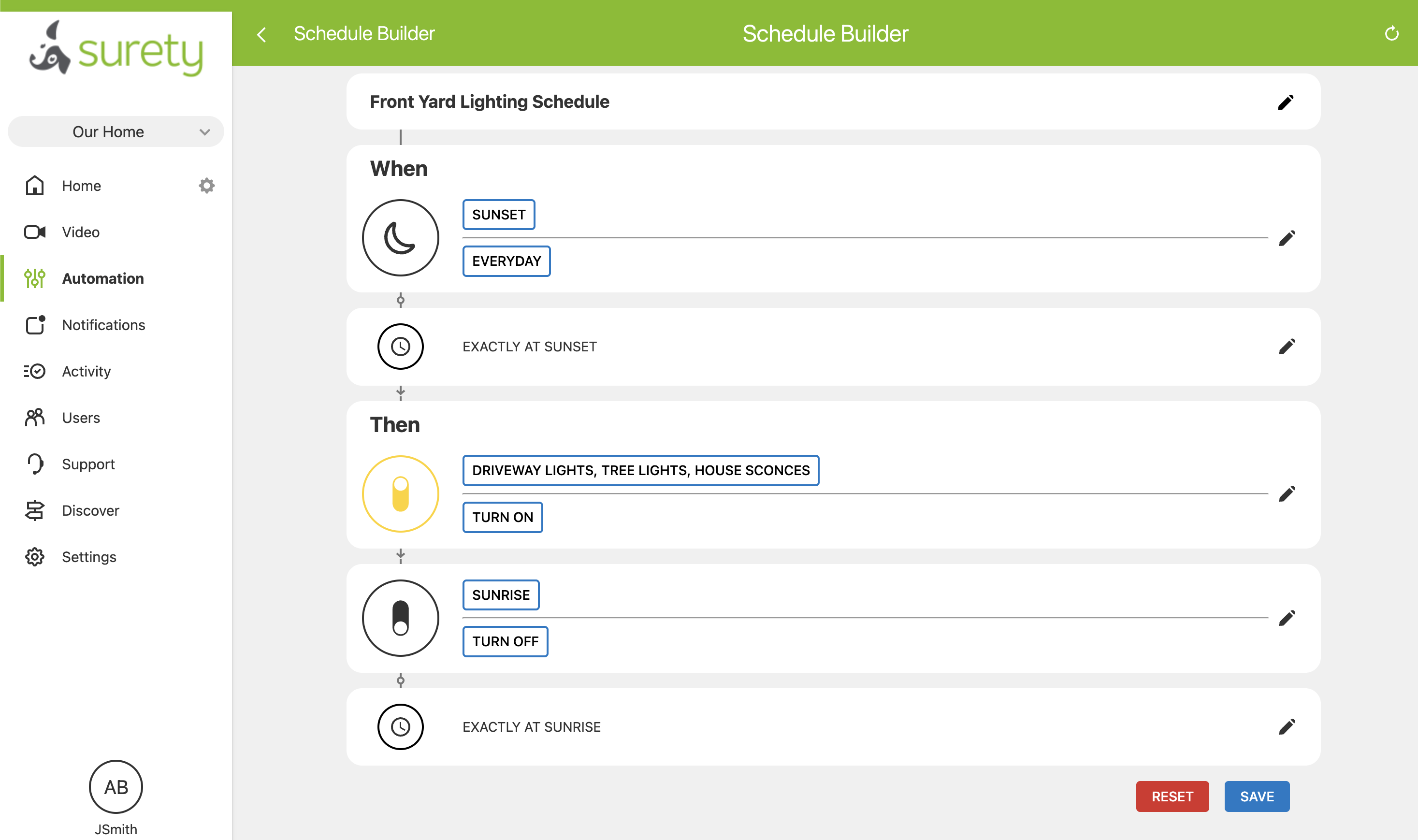
The security tie-ins are what set this apart from a standalone lighting timer. Because the lights live in the same platform as your alarm, you can build a rule that brings the yard up when the system is armed Away, or pushes every zone to full when an alarm triggers, turning your landscape lighting into part of the deterrent. Outdoor lighting is one of the oldest and most effective deterrents there is, and here it costs you nothing extra because the system is already on your panel. You can also pair an outdoor motion sensor or a camera’s motion analytics with a rule that lights a zone when someone approaches the walkway, and optionally sends a notification at the same time.
Everyday convenience rounds it out. A geofence rule can switch on the path and entry zones as the family arrives home after dark. Scenes let you group zones for the moment: an “Evening” scene for normal use, an “Entertaining” scene that brings up more of the yard, a “Vacation” routine that runs the normal dusk-to-dawn pattern so the home looks lived-in while you are away, and a “Goodnight” scene that drops everything to off or a minimal security level. And because each zone is independent, you can light just the walkway for the dog’s last trip out without flooding the whole yard. All of it lives alongside your cameras, locks, and sensors, controllable from anywhere.
On/Off vs. Dimming
Dimming is the most common question here, and the answer has real caveats. On/off control is the standard for landscape lighting, and for most homeowners it is all they need. A relay is a switch, not a dimmer, and on/off fully covers schedules, scenes, motion lighting, and away-mode security lighting. Zooz’s landscape-lighting guide is built entirely around on/off zone control, and the vast majority of installations get everything they want from it.
Dimming can add value in some setups: a softer “moonlight” level reduces glare, lower output is friendlier to neighbors and more dark-sky conscious by limiting light trespass, and dimmed LEDs draw less power. But dimming low-voltage landscape lighting through Alarm.com has real limits. The common standalone landscape dimmers, such as FX Luminaire’s low-voltage dimmer or units from Leonlite, DEKOR, and Kichler, are manual devices with no Z-Wave radio, so they do not integrate with Alarm.com at all.
There is also a technical trap: a regular 120V dimmer will not work, because the dimmer has to match your transformer type. When you dim on the line side, you are dimming the transformer’s input, and a transformer is not a simple resistive load like an incandescent bulb. A magnetic transformer is an inductive load and needs a magnetic-low-voltage (MLV) dimmer; an electronic transformer is a different, capacitive-type load and needs an electronic-low-voltage (ELV) dimmer, and only if it is rated as dimmable (many are not). Put a plain incandescent or LED dimmer on a magnetic transformer and you can get buzzing, flicker, a poor dimming range, an overheating dimmer, and in the worst case a damaged transformer. So if you want dimming, identify your transformer type, confirm it is dimmable, and match the dimmer to it.
If you do want dimming with Alarm.com, here are the realistic options, in order:
Option 1, the best and most future-proof path: 0-10V dimming with the Zooz ZEN54. This route uses DC LED fixtures fed by a 0-10V dimmable constant-voltage LED driver (12V or 24V), rather than a traditional 12V AC magnetic transformer. The Zooz ZEN54 0-10V Dimmer controls the driver’s 0-10V dimming signal for full brightness control in the Alarm.com app, with a built-in relay to cut power for a true off. Good examples include Mean Well’s outdoor-rated 0-10V dimmable drivers (the HLG series is a popular choice in DIY forums, and the ELG and LPF series also offer 0-10V dimming, in 12V or 24V), certain FX Luminaire and Kichler 0-10V models, and really any UL-listed 12V or 24V DC driver that explicitly accepts a 0-10V dimming input. Treat those as examples to confirm, not guaranteed part numbers: the driver must match your fixtures’ voltage, be sized to the total wattage, and be wet-location rated. Choose this path if you specifically want dimming and are willing to use DC LED fixtures with a 0-10V driver.
Option 2, the magnetic-transformer path: the Leviton DZMX1-1LZ. If you have a dimmable magnetic transformer, the only magnetic-low-voltage Z-Wave dimmer currently available in the U.S. is the Leviton Decora Smart Z-Wave DZMX1-1LZ. It works and integrates with Alarm.com, but it is a Decora-style in-wall paddle dimmer, which is usually not an ideal fit here, since landscape transformers typically sit at an outdoor outlet or junction box rather than behind an in-wall switch. It is workable, just not clean.
Option 3, the default for most installs: just use on/off relays. For the large majority of landscape systems, simple on/off control through the relay is the right answer. There is no dimming hardware to match and no fixture or transformer to swap, and you still get all the scheduling, scenes, and security automation that make the system worthwhile. If dimming matters to you, confirm your specific hardware with Surety Home before buying anything.
Getting Started and Installation Tips
Start by identifying what you have: confirm it is a hardwired low-voltage system with a transformer feeding buried cable, and find the transformer output and each zone’s wiring. For zone control, follow Zooz’s landscape-lighting guide and mount the relay where the transformer lives, powered from its 12 to 24 V output. If that is a garage, basement, or shed, it mounts there as-is; if the transformer is outdoors, put the relay in the transformer enclosure or a separate weatherproof box. Keep all line-voltage work, meaning the 120V feed to the transformer or any junction box, in the hands of a qualified electrician.
Before you finalize, verify the transformer’s wattage rating can power all the connected fixtures, and if your equipment sits far from the panel, be sure to enroll the relay with Smart Start to get Z-Wave Long Range. If the relay is mounted outdoors, keep it in a rated enclosure and dry. Finally, test your schedules, scenes, and each individual zone before you rely on the automation, so you know every zone responds the way you expect.
Limitations and Realistic Expectations
A few limits are worth mentioning. The relay is on/off only; dimming requires the ZEN54 0-10V route or the limited Leviton MLV option above, and is not how most systems are set up. There is no native Alarm.com landscape-lighting controller, so this is a switch-level approach using a standard Z-Wave relay, not a deep brand integration. One ZEN16 covers three zones, so larger systems need additional modules or relays and more wiring. If the relay is mounted outdoors, it must be protected and dry in a rated enclosure (a transformer in a garage, basement, or shed avoids this). The transformer’s capacity must still cover the connected fixtures, since the relay does not change your wattage budget. And the line-voltage side of any install should be done by a qualified electrician.
Frequently Asked Questions
Can I control my landscape lighting from the Alarm.com app? Yes. Alarm.com has no dedicated landscape-lighting controller, but you can bring a hardwired low-voltage system in with a standard Z-Wave relay. The relay appears in the app as a switch (or several switches, for multiple zones) that you can schedule and automate alongside your security devices.
How does the relay connect to my landscape lighting? For independent zones, it is wired on the low-voltage side, after the transformer, to switch each zone, mounted hidden inside the transformer enclosure or a weatherproof box and powered from the transformer’s low-voltage output. If you only want whole-system on/off, control the transformer at its power source instead: if the transformer plugs into an outlet, use a Z-Wave outdoor plug like the Zooz ZEN05; if it is hardwired, use a line-voltage-rated relay on the 120V feed, which is an electrician’s job.
Can I control different landscape zones separately? Yes. A Zooz ZEN16 MultiRelay controls up to three zones independently, and each one appears as its own switch in Alarm.com. For more zones, add another module or use additional relays.
Can I dim my landscape lights through Alarm.com? Yes, with the right hardware. The best, future-proof path is the 0-10V route: dimmable LED fixtures plus a 0-10V dimmable driver, controlled by the Zooz ZEN54 0-10V Dimmer for full brightness control in the app. For a dimmable magnetic transformer, the only Z-Wave magnetic-low-voltage dimmer in the U.S. is the Leviton DZMX1-1LZ, which works but is an in-wall paddle dimmer that is not ideal for a transformer at an outlet or junction box. A regular 120V dimmer is not a substitute, because the wrong type can buzz, flicker, or damage the transformer. For most homeowners, simple on/off relay control is perfectly good.
Will my landscape lights turn on and off automatically? Yes. You can use a fixed-time schedule (for example on at 7:00 PM and off at 11:00 PM, with different times by day of the week) or a sunset-to-sunrise schedule that follows dusk and dawn automatically as the seasons change. You can even combine them, such as on at sunset but off at a set time.
Is this safe to install myself? The low-voltage relay wiring is DIY-friendly for a confident homeowner, but anything on the 120V side (the transformer’s line feed) should be handled by a qualified electrician. Always mount the relay in a weatherproof enclosure and keep it dry.
