
August 20, 2026
My Circle: Home Security That Protects People, Not Property
Every sensor we sell answers a question about a building. Did the back door open. Is the basement wet. Did something move in the garage at 3am. Those are good questions and we have spent years getting very good at answering them. But they are not the question that actually keeps people awake, which is usually much simpler: is my mother okay, and is my kid okay, and how would I know if they were not?
A door sensor cannot answer that. Neither can a camera, once the person walks out of frame. So we have added something that can. Alarm.com My Circle is now live for Surety customers, and it is included at no additional cost on the Surety Home and Surety Complete plans.
The Problem With Checking In
The way most families handle this today is a text message. You send one, then you wait, and while you wait your imagination fills the silence. Nine times out of ten the answer is that the phone was in a coat pocket or the battery died at lunch. The tenth time is the one you were worried about, and a text does not tell you which kind of silence you are looking at.
The other problem is that checking in relies on the other person choosing to respond, and the people you worry about most are frequently the least likely to do it. Someone who does not want to be a burden will not call to say they are struggling. A teenager who had a rough day will not open with that. The CDC notes that more than one in four older adults falls each year, and less than half tell their doctor. If people are not reporting falls to a physician, they are certainly not calling their adult children about a bad morning.
My Circle takes the reporting burden off the person you are worried about and puts it on their phone.
What You Actually See
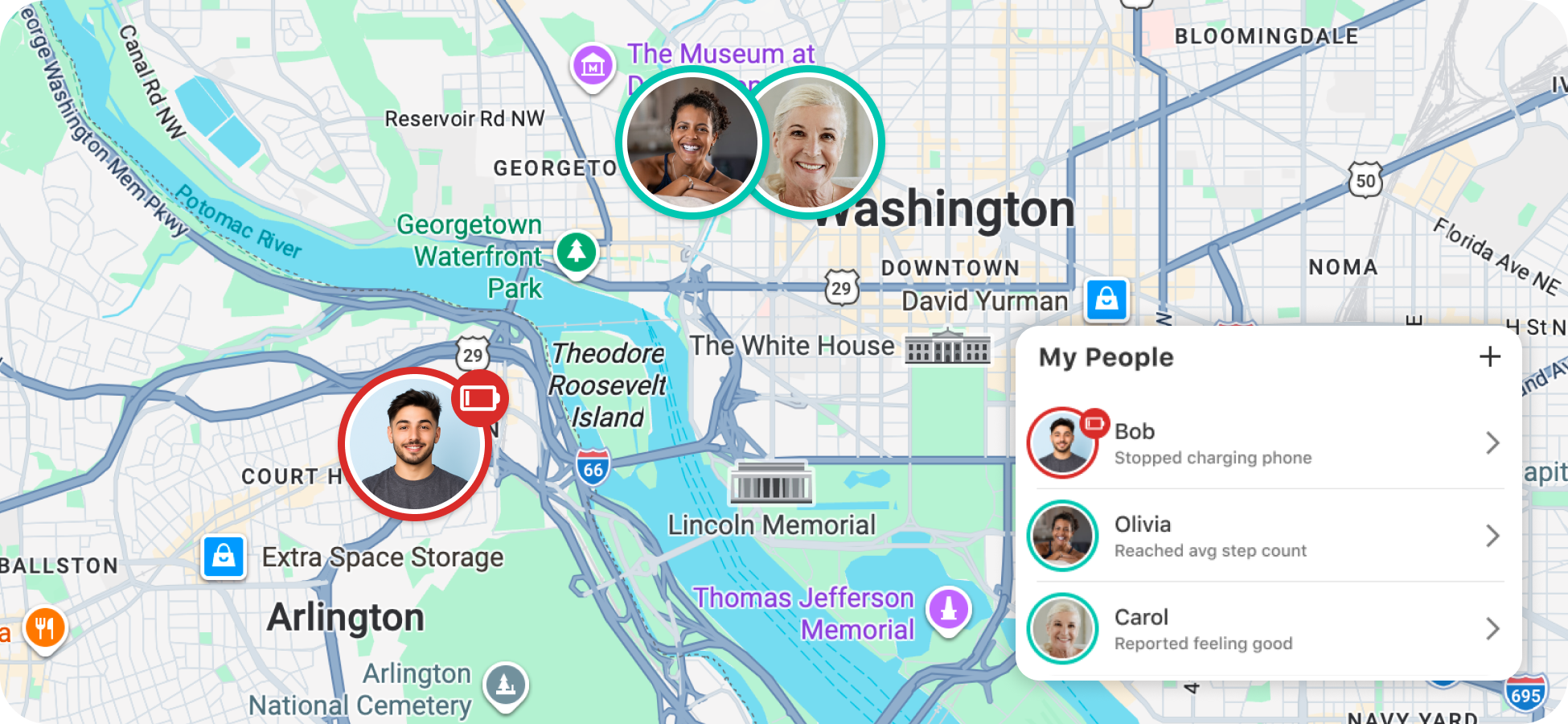
Everyone in a circle gets a card on a shared dashboard in the Alarm.com app. There is no hardware in this, nothing to install and nothing to mount. The card carries four things, and the reason it works is that the four together say more than any one of them does alone.
| Signal | What it is | The question it answers |
|---|---|---|
| Feeling | A one-tap mood check-in from the person | Are they doing alright, in their own estimation? |
| Location | Live position on a map, plus home and away status from a geofence | Where are they, and have they been home today? |
| Battery | Their phone’s remaining charge | Is the silence explainable? |
| Activity | Step count for the day | Are they up and moving around? |
The one-tap part of the mood check-in is not a small design detail. It is the entire reason that signal produces any data at all. Nobody composes a paragraph about how they are feeling and sends it to their family, but almost anyone will press a button, and a pressed button is infinitely more information than an unanswered text.
Step count is the signal families tend to underestimate. It is crude, and that is the point. Zero steps at two in the afternoon from someone who walks the same loop every single morning is not a wellness metric, it is a reason to call, and a reason you would not otherwise have had. Alerts fire automatically when a whole day passes with no activity detected, when a phone battery drops low, when someone leaves or returns home, and when a mood check-in comes back poor.
Those alerts can go to more than one person. If you and your brother are splitting the worry about your father, you both get notified, and neither of you has to be the designated one who remembers to look at an app.
For Aging Parents
The demand we hear about most comes from adult children with a parent living alone. AARP’s 2024 survey found that 75 percent of adults 50 and older want to stay in their current home as they age, and 73 percent want to stay in their community. That preference is nearly universal, and the thing standing in its way is rarely the house. It is the family’s uncertainty about what is happening inside it on any given Tuesday.
We have written before about how to help a parent age in place with Alarm.com, and the gap in that toolkit was always the same: everything stopped at the property line. Sensors in the house tell you about the house. My Circle keeps reporting when your father drives to the pharmacy, sits in a waiting room for an hour, and forgets to mention any of it.
For Teens
Families with teenagers use this for a different reason, and it is less about safety monitoring than about removing a recurring argument from the house. “Where are you” is a question that lands badly no matter how kindly you ask it, because the teenager hears an accusation. A map removes the need to ask. You look, you see they are at practice, and the conversation you were going to have does not happen.
The mood check-in matters more here than most parents expect. A kid who will not say out loud that the day went badly will sometimes tap a button that says it for them. That is a very low bar to clear, and clearing a low bar is better than failing a high one.
Consent Is Built Into the Product, Not Left to the Family
Everything above describes sharing genuinely sensitive information: where a person is, how their body is doing, and how they say they feel. We are not going to pretend that is a small thing to hand over, and it is precisely why the feature is built the way it is. My Circle is opt-in at every layer, and the consent is enforced by the product rather than left to families to negotiate among themselves.
- Nobody gets added to a circle. Everybody gets invited. There is no mechanism for placing a person into a circle from your login. They receive an invitation, install the app on their own phone, and build their own profile. If they never accept, they never appear.
- Each person accepts the My Circle terms for themselves. Agreeing on someone else’s behalf is not possible, and the feature does nothing for them until they have agreed.
- One refusal outranks everyone else’s approval. If any user on the account declines the My Circle terms, the feature is disabled for every login on the account, including the owner’s. A single family member’s objection is enough to switch the whole thing off.
- The person being monitored holds the switch. Location sharing and activity sharing are separate toggles in their own profile settings, on their own device. They can turn either one off at any time, without asking anyone, and their data stops appearing on the dashboard.
- The phone’s own permissions are a second, independent gate. Even with sharing enabled in the app, iOS and Android still require the person to grant location and motion access on the device itself. Revoking it there stops the data too, and it cannot be re-granted remotely.
- Access to the account is not the same as permission to monitor. Read-only and limited-access logins cannot participate as caregivers at all, and custom logins need a specific My Circle permission granted deliberately. Simply having a login on the system does not let someone watch a family member.
- The view is mutual, not one-directional. Everyone in a circle sees the circle. There is no hidden or observer-only mode, so the person sharing their location knows exactly who is looking and can see the same information about them.
The scope is deliberately narrow, too. My Circle reports four things: a self-reported mood, location, battery level, and step count. It is not a window into someone’s phone, and it is not designed to be one. If you are looking for a tool to read a teenager’s messages, this is not it, and we would push back on the idea anyway.
Our advice, which we give every customer who asks about this: have the conversation before you send the invitation. A parent or a teenager who understands what is being shared and why will leave it on. Someone who discovers it later will turn it off, and they will be right to. The product cannot manufacture trust for you, it can only make sure nobody is monitored without agreeing to it first.
Where It Sits Next to What You Already Have
Alarm.com has three features aimed at people rather than property, and they get confused with each other constantly, so here is the distinction we use when customers ask.
| Feature | What it uses to watch the person | Where it works |
|---|---|---|
| My Circle | The Alarm.com app on their phone | Anywhere they go |
| Wellness | The security system already in the house: door sensors, motion detectors, pressure pads, pendants | Inside the monitored home |
| Safety Button | The Alarm.com app, on demand, to reach the monitoring station | Anywhere they go |
All three watch a person. The difference is the instrument. Wellness builds a picture of someone’s routine out of the sensors that are already on the walls, then flags the days that do not look like the other days. My Circle builds a much simpler picture out of the phone in their pocket, and keeps building it after they leave. The Safety Button is not passive at all: it is the thing they press when they already know something is wrong.
Running Wellness and My Circle together is the combination we recommend for a parent living alone, because it means the picture does not end at the front door.
What My Circle Will Not Do
It is not an emergency response service. Nothing in My Circle contacts a monitoring station or dispatches anyone. It tells you and the rest of the circle that something looks off, and then a human has to decide what to do about it. If you want a way for someone to summon help directly from anywhere, that is the Safety Button, which is also included on both of these plans.
It depends entirely on a phone that is charged, powered on, and carrying the right permissions. Location sharing and activity sharing have to be enabled by the person being monitored, on their own device, and they can switch them off whenever they want. On Android, the phone’s battery optimization has to be disabled for the Alarm.com app or the data quietly stops arriving a day or two later. This is the single most common reason a card goes empty, and it is worth checking before you conclude the feature is broken.
And it cannot be used on someone who has not agreed to it. That is a design decision rather than an oversight, and it is covered in detail above, but it bears repeating as a limitation: if the person you are worried about does not want to share their location, My Circle is not the answer for your family.
What It Costs
Nothing, if you are on the right plan. My Circle is included at no extra charge on Surety Home and Surety Complete, which start at $17 and $24 per month, and like every plan we offer they are month to month with no contract and no cancellation fee. You add the feature to your own account and there is no charge for it.
It needs the Alarm.com app on iOS 5.9.8 or newer, or Android 5.7.6 or newer, and setup has to be completed on a phone rather than a tablet. The full walkthrough, including how to invite a parent who does not have their own login yet, is in the My Circle documentation on our support forum, and our team can walk through the setup with you if you would rather not do it over the phone with your mother from two states away.
Frequently Asked Questions
Does My Circle cost extra? No. It is included with the Surety Home and Surety Complete plans at no additional charge. You add it to your account yourself and there is no fee.
Can I add someone who lives in another state? Yes. My Circle reports from the person’s phone, not from your monitored property, so it does not matter how far away they live. Long distance is the situation it handles best.
What happens if they turn off location sharing? Their data stops appearing on your dashboard. Each person controls their own sharing from their own phone and you cannot override it from your login, which is deliberate.
Can I monitor someone without them knowing? No, and the product is built specifically to prevent it. A person has to accept an invitation, agree to the My Circle terms, enable sharing in the app, and grant location permission on their own phone. They can also see everyone else in the circle and revoke their own sharing whenever they want.
What information does My Circle actually collect? Four things: a mood check-in the person taps themselves, location, phone battery level, and daily step count. It is not general-purpose phone monitoring and it does not give you access to someone’s messages or activity on their device.
Why does my mother’s Android phone show a constant My Circle notification? That is expected. Alarm.com uses it to pull updated step data from Android devices. Leave it alone rather than dismissing it.
