
May 12, 2026
How to Help a Parent Age in Place with Alarm.com
There is usually a single moment when an adult child realizes that a parent living alone is taking on more risk than anyone in the family has been comfortable acknowledging. A minor fall in the bathroom that did not come up for three days. A missed call from the doctor’s office. A morning when no one could reach Mom and the whole family spent twenty silent minutes refreshing their phones. The parent is fiercely independent, has no interest in moving to assisted living, and is right to want to stay home. The family is also right to be worried. Both can be true at the same time.
According to the CDC’s older adult falls data, one in four adults aged 65 and older falls each year, falls are the leading cause of injury death in that age group, roughly 3 million older adults are treated in emergency departments for fall injuries annually, and one in five falls causes a serious injury such as a broken bone, a hip fracture, or a head injury. Most of those falls happen where no one is watching: a 2025 study in JAMDA found that as many as 81% of older-adult falls are unwitnessed, occurring in bathrooms and bedrooms when no one else is in the room. For a parent living alone, “unwitnessed” is the default, and the most dangerous part of a fall is often not the impact itself but the time spent on the floor afterward before anyone knows what happened. With roughly one in five Americans now age 65 or older, this is a question more families are facing every year.
This article is about the technology layer that lets a parent stay home longer while giving the family enough awareness to act early when something is actually wrong. Specifically, it covers Alarm.com Wellness monitoring, medical pendants, the Alarm.com Safety Button, and cameras, and how a family would actually combine them. None of this replaces a phone call or a visit. It simply makes the silent emergencies louder and the day-to-day routine visible enough that no one has to guess.
Why “I’ll Just Call More Often” Is Not Enough
Phone check-ins are valuable but they miss the scenarios families worry about most. A parent who does not want to worry anyone will say “I’m fine” through a broken wrist. A fall at 2 AM does not wait for the morning call. A stroke that makes speech difficult also makes dialing impossible. The very moments when a check-in matters most are the ones a check-in is least likely to capture.
Passive activity monitoring fills that gap. Instead of relying on the parent to reach for a phone or press a button, a small set of unobtrusive sensors quietly tracks the daily rhythm of the household: when the bedroom door opens in the morning, when the kitchen sees its first activity, when the bathroom is used through the day, when the living room chair is occupied. The family does not stare at this data. The platform watches it on their behalf and surfaces a notification only when something is meaningfully different.
The core advantage of the Wellness approach is structural: of eleven notification types available in a typical aging-in-place setup, ten require no action from your loved one. Only one (the personal emergency button press) depends on the parent doing something. The other ten fire passively based on sensors and the routines the system has learned. That is the difference between a technology that works when your parent is healthy enough to use it and a technology that works when they need it most.
The Alarm.com Wellness Add-On: How Passive Monitoring Works
Wellness is an optional add-on to a standard residential Alarm.com plan. The system itself is an Alarm.com monitoring system at the parent’s home including the sensors described below. There is no separate aging-in-place app; daily activity, behavior baselines, notifications, and trends all live inside the single Alarm.com app that runs on the family’s phones. The Wellness add-on uses motion sensors, door and window contact sensors, and optionally bed sensors and chair sensors placed in the rooms a parent uses most. The sensors communicate to the panel, which forwards activity to the Alarm.com cloud. No cameras are placed in private spaces like bedrooms or bathrooms; the sensors handle those rooms specifically to preserve privacy.
Inside the Alarm.com app, family members have two main views of activity. The Activity by Sensor view shows a 24-hour timeline of every sensor activation, color coded so the picture is easy to read at a glance: blue for a normal activation, yellow for a sensor alert, red for an emergency button press. Tapping a sensor reveals the exact time the bathroom motion fired or how long the bedroom door has been open. The Activity by Room view summarizes the same information room by room, which is the faster way to answer the question that comes up most often in practice: “Was the kitchen used this morning?”
The deeper value of the Wellness platform comes from what it does with that activity over time. The platform builds an averaged baseline of the parent’s normal patterns (when they typically wake, how many times they usually visit the bathroom, when they settle into their chair, how long they tend to sleep) and then compares each day against that baseline. The Behaviors view flags meaningful deviations in yellow (moderate) or red (significant), and the Trends view shows the typical high and low points for each sensor across the day. The family is not reading raw activity logs every morning. They see a signal only when something has actually changed.
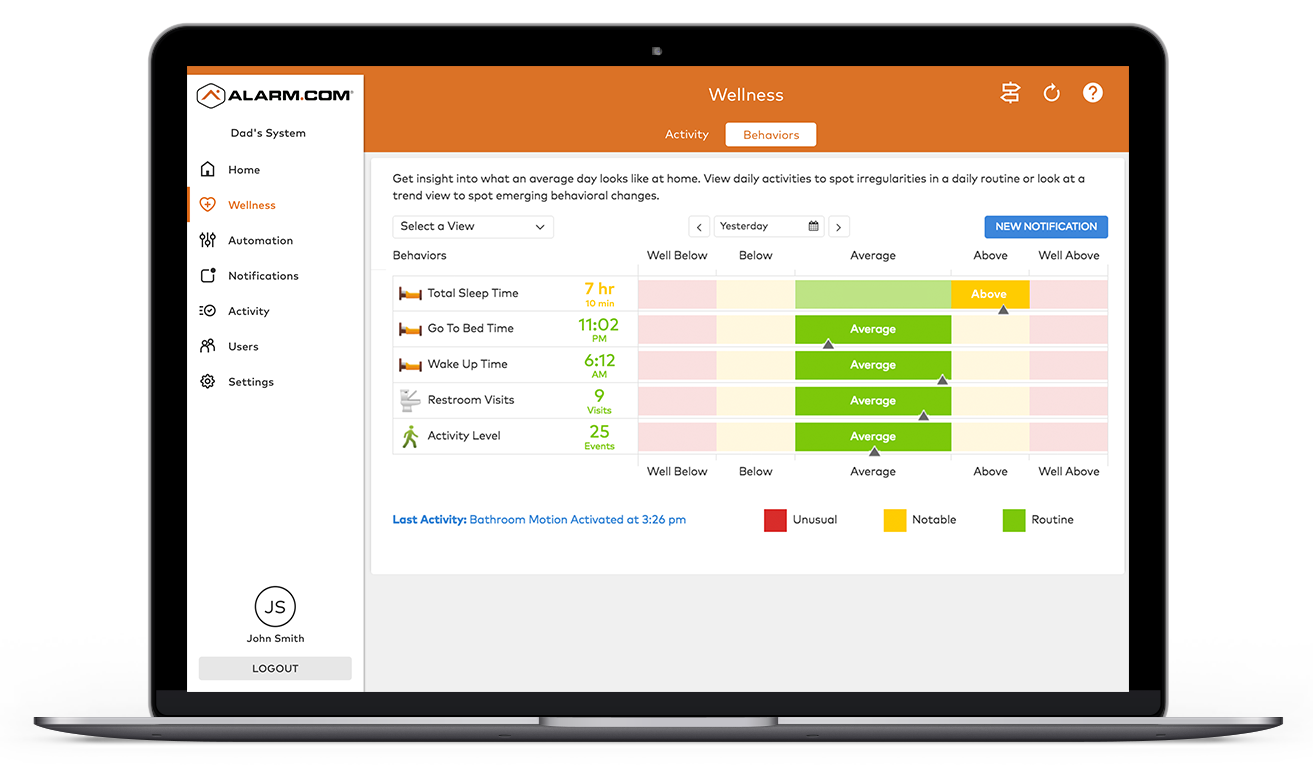
Pattern learning is per person and per time of day, which matters more than it sounds. Two parents in identical houses can have completely different “normal.” One is up at 5 AM and in bed by 8 PM; another sleeps in until 9 and stays up until midnight. The platform learns whichever pattern the parent actually has, scoring anomalies against their own history rather than against a one-size-fits-all template. The first couple of weeks after installation are mostly the system learning; the longer it watches, the smarter the alerts get.
The table below shows how the sensors map to the behaviors the platform tracks. A family does not need every sensor in this list; the right setup depends on the parent’s routine and the family’s specific worries.
| Sensor | Location | What it tracks |
|---|---|---|
| Exterior or front door contact sensor | Entry | Exits and Entries (did they leave the house today?) |
| Bed sensor | Bedroom | Sleep behaviors: Total Sleep Time, Go To Bed Time, Wake Up Time |
| Chair sensor | Living room | Activity Level (time spent in the favorite chair) |
| Living room motion sensor | Living room | Activity Level |
| Bathroom motion sensor | Bathroom | Restroom Visits |
| Kitchen motion sensor | Kitchen | Kitchen Visits |
| Refrigerator door contact sensor | Kitchen | Kitchen Visits (a proxy for eating) |
| Medication cabinet door sensor | Anywhere | Medication compliance (did they open the cabinet today?) |
One technical note worth understanding because it affects how families read alerts: on a Wellness account, motion sensors report one of two states, Activated (motion detected recently) or Idle (no motion for 20 minutes or more). The Idle timestamp is backdated to three minutes after the last detection so that activity history reads as a smooth picture of the day rather than a rapid-fire stream of status changes. The practical implication is that a “no activity” notification has an inherent resolution of about 20 minutes, not instantaneous. This is specific to how motion sensors report on Wellness accounts and does not affect the rest of the system. For the silent-emergency case the article cares about, 20 minutes is the right window: long enough to filter out a parent who is simply sitting still and reading, short enough to catch a real problem early.
The core Wellness monitoring works without cameras and without wearables. Motion sensors, contact sensors, and bed or chair sensors are all the platform needs to function fully. Cameras and pendants, covered later in this article, are worthwhile additions for many families, but neither is a prerequisite. A parent who objects to cameras or refuses to wear a device still gets the full passive monitoring benefits.
Wellness Notifications: What Fires and When
Wellness notifications are configured in the Alarm.com app. They are time-of-day aware (the family can specify that an alert applies only between certain hours) and can be sent to multiple recipients at the same time. Both adult children, a nearby neighbor, and a sibling in another state can all receive the same Up and About alert and can each set their own notification preferences. Different recipients can also opt in to different events. A daughter who lives nearby and does the day-to-day might want the full alert stream; a son who lives across the country might prefer only the highest-priority alerts plus a daily Sleep Behaviors or Bathroom Visits summary; an out-of-town sibling might only want to be told about Personal Emergency events. The platform supports those preferences per recipient. The notifications most relevant to an aging-in-place setup are described below in plain language.
Personal Emergency. Fires the instant a medical pendant or panic button is pressed. The alert routes to family members and, if professional monitoring is active, to the monitoring center as well. This is the one notification that requires the parent to take an action. It is also the only one that does.
Up and About. Fires when no sensor activity is detected for an unusual length of time. This is the silent-emergency catch the rest of the platform is built around. If a parent is on the bathroom floor and cannot reach a button, the absence of motion in the kitchen at 10 AM will eventually trigger this alert. The family gets a notification and can follow up with a call, a camera check, or a wellness visit. Per the CDC fall data cited earlier, the time spent on the floor before help arrives is one of the most dangerous variables in a fall outcome; Up and About is the alert that compresses that window.
Away From Bed. Fires when a bed sensor is unoccupied during a time window the family specifies, for example between midnight and 5 AM. Useful for catching nighttime wandering or a fall on the way to the bathroom in the dark.
Still in Bed. The mirror image: fires when a bed sensor stays occupied longer than expected. If a parent normally gets up by 8 AM and it is now 10 AM with no movement, the family wants to know.
Missed Medication or Sensor Not Activated. Fires when a sensor (such as a medication cabinet door) is not activated during a configured window. Useful for a parent who takes a morning pill and typically opens the cabinet between 7 and 9 AM. A single sensor on a medication cabinet door becomes a quiet medication-compliance check without any wearable, app, or smart pillbox.
Safe Inside. Fires when a sensor is activated, confirming the parent has reached a designated safe area. A common use: a contact sensor on the master bedroom door that confirms the parent made it to bed.
Additional notification types are available for more granular scenarios: Sensor Activity, Sensor Closed or Occupied, Sensor Left Closed or Occupied, and Sensor Left Open or Vacant. These are building blocks families can use to construct rules specific to a parent’s situation, like a refrigerator that stays closed too long or a front door left open after dark.
Unexpected Activity. Fires when a sensor activates at a time or in a location that falls outside the parent’s learned routine. For an aging-in-place setup this is one of the most useful notifications on the platform. A parent who is normally settled by 9 PM but is wandering the kitchen at 2 AM, or a bathroom sensor that activates six times before 6 AM when once is typical, surfaces as an Unexpected Activity alert. That kind of behavioral shift can be an early sign of a urinary tract infection, a medication side effect, or the beginning of a cognitive change. The family sees it without having to read raw activity logs and can call the parent or their doctor while it is still a small problem instead of a hospital admission.
Counting Personal Emergency, Unexpected Activity, and the nine other types above, there are eleven notification categories available in a typical aging-in-place setup. Ten of them fire passively based on sensors and learned routines. Only Personal Emergency depends on the parent pressing something. That is the structural reason this approach catches situations a button-only pendant cannot.
Medical Pendants: The Button That Goes Where Your Parent Goes
Medical pendants are wearable devices that connect to the Alarm.com system. When pressed, they immediately trigger a Personal Emergency alert routed to family members and, if monitoring is active, to the professional monitoring center. A pendant works throughout the home, not just in the room where the panel is mounted. Several categories are available through Surety Home, and the right choice depends on what concerns the family most: a basic wearable panic button, a waterproof pendant for the shower, a two-way voice pendant for residents who would rather talk to an operator than wait for a callback, and a fall-detection pendant that fires automatically when a fall is sensed even if the wearer cannot press anything.
The fall-detection category deserves a specific mention because it directly addresses the scenario families worry about most. A traditional pendant only helps if the wearer can press it; a fall-detection pendant fires an automatic Personal Emergency alert when its accelerometer recognizes a fall pattern. Combined with the passive Up and About notification described earlier, a fall-detection pendant gives a family two independent ways of catching a fall: one immediate (the wearable), one slightly delayed but unmissable (the inactivity alert). Families interested in a fall-detection wearable should contact Surety Home for current supported devices.
One pendant is worth calling out by name: the Alarm.com IndiGo portable PERS pendant. This is a cellular pendant with built-in two-way voice, which means it does not depend on the home’s Wi-Fi or the range of a panel to work. A parent can wear it anywhere (inside the house, in the backyard, walking the neighborhood, out running errands) and pressing it connects them directly to a monitoring center operator over two-way voice. No smartphone required, no need to be near the panel. For seniors who leave the house regularly, this addresses the most common gap in traditional panel-based pendants, which only work within a finite range of the home.
The other wearable panic pendants Surety Home offers pair with the home’s security and wellness hub instead of carrying their own cellular radio. They have long battery life, are worn as a pendant or wristband, and work anywhere on the property within range of the hub. They do not have onboard two-way voice; when pressed, they trigger two-way voice on the hub itself, so the parent speaks with the monitoring center through the hub’s speaker rather than through the pendant. The practical implication is that for the voice channel to work, the parent needs to be within earshot of the hub (which usually means inside the home, not out in the yard). One thing to verify before buying: two-way voice is supported on some Alarm.com wellness hubs but not all, so it is worth confirming with Surety Home that the specific hub being installed has the two-way voice feature before ordering pendants that rely on it. Both paths route the same Personal Emergency alert and reach the same monitoring center; the difference is where the two-way voice happens. For a parent who spends most of their time inside the house and rarely travels far, a hub-paired pendant is often the more economical choice. For a parent who walks the neighborhood, gardens, or runs errands alone, the IndiGo’s cellular two-way voice is the better fit.
Two-way voice matters more than it sounds. Without it, a button press is a signal that something is wrong; someone still has to figure out what. With it, the monitoring operator hears the parent say “I fell in the kitchen, I think my hip is broken” in the same second the alert lands. The latency of the response changes from minutes of trying to assess what happened to seconds of acting on what is being described. In falls, cardiac events, and medical episodes where the first minute matters, that compression is the entire point.
The key distinction between a pendant on the Alarm.com system and a standalone consumer medical alert service (Life Alert, Medical Guardian, and similar): a pendant on the Alarm.com system fires its alert through the same app that already shows the parent’s activity timeline, routine baselines, and notifications. The button press lands next to the rest of the Wellness picture rather than in a separate medical-alert portal that the family has to remember exists. There is no second app, no second subscription to manage, and no extra vendor relationship. When the goal is to keep the technology layer simple enough that everyone actually uses it, that consolidation matters.
The Alarm.com Safety Button: Emergency Help from Any Phone, Anywhere
The Safety Button is a feature of the Alarm.com mobile app available to U.S. customers. There is no additional hardware to buy, and it is included with all Surety Home plans at no extra charge. For a parent who is already comfortable with a smartphone, this is a meaningful piece of coverage that lives in a device they already carry everywhere.
The mechanics are simple. The user opens the Alarm.com app, taps the Safety Button, and holds it down. When they release, a 10-second window appears to cancel using a PIN. If they do not cancel, a trained monitoring center operator receives an alert that includes the user’s name, phone number, and precise GPS coordinates. The operator attempts contact by text and phone, and if there is no response, emergency services are automatically dispatched to the last known GPS location. The whole flow is designed to be usable in a moment of distress, not in a quiet practice session.
Three features of the Safety Button matter most for an aging-in-place setup. Safety Button Notes let the user pre-enter contextual information (medical conditions, emergency contacts, allergies, the location of a hidden key) that is shared with the monitoring operator and first responders when an event fires. For a parent on blood thinners or with a pacemaker, that information is already in the operator’s hands before responders arrive. Safety Button Check-Ins let the user schedule a future check-in (for example, “check in on me at 3 PM after my doctor’s appointment”). At the scheduled time, the app sends a push notification. If the user taps “I’m Safe,” nothing happens. If they tap “Send Help” or do not respond within 10 minutes, location information is shared with the monitoring operator and, if there is still no response, emergency services are dispatched. Check-ins can be scheduled as soon as 5 minutes in the future or as far out as the end of the following month, with at least 2 hours between scheduled check-ins. Emergency Contacts let family members be added to the Safety Button profile; when an event is dispatched, the monitoring operator shares these contacts with the 911 operator so the family is in the loop from the first call.
The Safety Button is GPS-based, which means it works anywhere in the United States where the phone has service, not just at home. A parent who falls in a grocery store parking lot, feels unsafe walking back to their car after dark, or gets disoriented on an errand has an emergency channel that follows them wherever the cellular network reaches. It also supports two-way text for situations where the parent cannot speak (bystanders, a medical event that makes talking difficult). A few important caveats: the Safety Button is not a replacement for calling 911 directly when that is faster; it requires the Alarm.com app on Android or iOS 5.3.1 or newer; Location Services must be enabled at the “Always” level for GPS dispatch to work correctly; and it is currently available only in the United States.
Cameras: Visual Confirmation and Two-Way Connection
Cameras are optional in a Wellness setup, but for many families they are the difference between a notification that creates anxiety and a notification that resolves quickly. When an Up and About or Away From Bed alert fires, the family member can pull up the live view of an indoor camera in the kitchen or living room and see, in five seconds, whether the parent is at the table reading the paper or whether something is actually wrong. Two-way audio through the same camera lets the family member speak directly to the parent without the parent needing to do anything on their end. A check-in that would otherwise be a worried phone call becomes a friendly “Hi Mom, just saw the alert, you good?” through the camera speaker.
Outside the home, an outdoor or doorbell camera adds two more useful capabilities. A Video Analytics notification fires when a person is detected at the front door, so the family knows the parent has arrived home from an appointment without having to call and ask. The doorbell also lets a family member remotely see and speak with anyone who shows up at the parent’s door, which is meaningful protection against the door-to-door scams that disproportionately target seniors. From the parent’s perspective, knowing that a family member can “answer the door” remotely is a real source of confidence in situations that would otherwise be stressful.
One privacy point belongs in this section explicitly: camera access on an Alarm.com account is configurable. If cameras are added to the home, they can be scoped so that only the senior themselves has access (preserving their privacy entirely from family members), or they can be shared with family members if that is what everyone is comfortable with. This is a genuine choice for the family to make, not an assumed default in either direction. Some seniors are willing to have cameras for their own use but not willing to have their children watching a live feed at any moment, and the platform supports that arrangement.
Cameras in private spaces (bedrooms, bathrooms) are not appropriate and are not part of the Wellness approach. Those rooms are covered by motion and contact sensors specifically so that the family can know whether the bathroom was used this morning without anyone ever seeing footage from inside it. The whole point is to extend independence, not to feel surveilled.
A Day in the App: How the Pieces Combine
The features above are easier to understand in the shape of an actual day. The walkthrough below is a typical morning, afternoon, and overnight from the family’s perspective inside the Alarm.com app.
7:45 AM. The bathroom motion sensor activates. This is normal for this time of day, well inside the parent’s learned routine, so no notification fires. The activity simply appears in the Activity by Sensor timeline.
8:10 AM. The medication cabinet door opens. The Missed Medication notification does not fire because the cabinet was opened inside the configured window. The family does not see anything; the absence of an alert is the signal.
8:30 AM. The kitchen motion sensor and the refrigerator door contact sensor both activate. Activity by Room shows the kitchen was used. The parent is having breakfast.
2:00 PM. The adult child has a quiet moment of worry, the kind that comes from no specific trigger. They open the app. The Activity by Sensor view shows the living room chair sensor activated at 1:15 PM. The parent is in their chair, which means a nap is likely in progress. The child opens the indoor camera’s live view, uses two-way audio to say “Hi Mom, just checking in,” gets a wave back, and closes the app feeling better. Total elapsed time: under a minute.
11:30 PM. The bed sensor activates. The parent has gone to bed. No notification fires.
3:00 AM. The bed sensor goes unoccupied. The Away From Bed notification fires. The adult child’s phone gets a push notification. They check the app and see that the bathroom motion sensor activated at 3:01 AM. The parent has gotten up to use the bathroom. Normal for them. The alert was worth receiving, and the two seconds of looking at the app resolved it. If instead the bathroom sensor had not activated and no other room showed motion within the next 20 minutes, Up and About would have escalated, and the family would have had a real reason to act.
This is what a Wellness setup looks like in practice. Most days, the family sees nothing at all because nothing unusual is happening. The system is doing its job specifically when nothing is doing its job. The moments it speaks up are the moments that count.
Two Stories That Show Why Early Intervention Matters
The bathroom fall that did not become a hospital admission. In one Alarm.com case, an older adult got up at night, went to the bathroom without their pendant, and fell. Without a passive monitoring layer, they would have been on the floor for somewhere on the order of ten hours before anyone noticed, which is the timeline that pushes a fall toward a hospital admission for dehydration on top of whatever injury the fall itself caused. With Wellness in place, the bed sensor reported the parent had not returned to bed within their normal overnight window, the Away From Bed notification fired, and someone intervened in minutes rather than the next morning. The fall itself was unavoidable; the ten hours on the floor were not.
The UTI a family caught from the bathroom visit pattern. In another Alarm.com case, a daughter monitoring her 87-year-old mother through the Wellness app noticed that the Bathroom Visits behavior showed six bathroom trips in a single night, which was well outside her mother’s baseline. She called the doctor, the office tested for a urinary tract infection, and the UTI was caught early enough to be treated with oral antibiotics at home. Without that pattern visibility, the more likely path was a UTI escalating into a bladder infection or sepsis that ends up at the emergency room days later. Six bathroom trips in a night is the kind of detail a phone check-in will never produce; the parent will not bring it up because they did not realize it was unusual.
Neither of these is a guaranteed outcome of installing the platform, and the prompt is not to swap a phone call for a dashboard. The point of including them is that the early-intervention pattern is real, it has been documented in Alarm.com’s own case material, and the kinds of issues it catches (a fall caught fast enough to skip the hospital, a UTI caught before it becomes a crisis) are exactly the issues families with an aging parent at home worry about.
Alarm.com Wellness Compared to Other Approaches
Most families considering aging-in-place technology end up choosing among three options: a consumer medical alert pendant, a camera-only setup, or a full Wellness monitoring system. The table below compares them on the dimensions that matter for a parent living alone.
Before the table, a quick map of the broader landscape so families know what else they are likely to encounter while researching. Beyond Life Alert-style pendants, there is a growing category of purpose-built consumer passive monitoring products aimed specifically at families with an aging parent. The clearest direct competitors to mention by name are Aloe Care Health (a voice-enabled hub with motion and door sensors and a wearable button), envoyatHome (an eight-sensor passive network with AI behavioral monitoring and trend reports), Nomo Smart Care (an AI hub with motion and sound sensing that learns routines), GrandCare Systems (a long-established sensor platform with an optional senior-facing touchscreen for reminders and family video calls), and emerging radar-based systems like Pontosense Silver Shield that detect falls and prolonged inactivity from a single wall-mounted unit per room. CarePredict’s Tempo series, which families may also see mentioned in senior-care contexts, sells a consumer version of its wearable-plus-room-beacon product as well. These products do real work; any of them is more capable than a pendant-only setup, and a family is correct to be looking at the category.
The structural differentiator with Alarm.com Wellness through Surety Home is not that those products are bad. It is the platform behind it. The Alarm.com system at the parent’s home is also a full residential security and home automation system: door and window contacts, smoke and carbon monoxide detectors, smart locks, smart thermostat, garage door control, cameras, and the rest of the platform are all available on the same plan. The single-purpose passive monitoring products do not offer that. They do their one job and stop there.
There is also a benefit on the family’s side worth considering. Many of the adult children who help with a parent’s wellness setup already have an Alarm.com security system in their own home, often through Surety. For those families, the parent’s Wellness system shows up under the same Alarm.com login the adult child already uses to arm their own house, check their own cameras, and unlock their own front door. Two homes, one app, one login, no second subscription portal to learn. That is a real benefit for the family member doing most of the monitoring, and it is one a standalone aging-in-place product cannot match no matter how good its analytics are.
One more category is worth a sentence because in practice it is the most common thing families have already bought before reading this article: the Apple Watch with fall detection and Emergency SOS. The Watch is a meaningful piece of safety equipment for a parent who reliably wears it and keeps it charged, and its automatic fall detection has saved real lives. What it does not do is monitor the home itself. It cannot tell whether the bathroom was used this morning, whether the medication cabinet was opened, whether sleep was restless, or whether a sensor pattern looks like an emerging urinary tract infection. It also depends entirely on the parent putting it on every day and charging it overnight, which is not a given for everyone. The Watch and Alarm.com Wellness do not compete; they cover different gaps, and plenty of families end up using both.
| Feature | Consumer Medical Alert | Cameras Only | Alarm.com Wellness (Surety Home) |
|---|---|---|---|
| Passive activity monitoring (no button press needed) | No | Partial (requires someone to watch footage) | Yes (motion, bed, chair, and contact sensors) |
| Automatic fall detection | Some services | No | Yes (with a compatible fall-detection pendant) |
| Silent-emergency catch (Up and About alert) | No | No | Yes |
| Medication reminder tracking | No | No | Yes (sensor-based) |
| Two-way voice with the senior | No | Yes (via camera) | Yes (cameras plus two-way voice pendants) |
| Video check-in from family’s phone | No | Yes | Yes (cameras with live view) |
| GPS-based emergency dispatch outside the home | Some | No | Yes (Safety Button) |
| Includes home security and automation in the same system | No | No (cameras only) | Yes (full Alarm.com platform) |
| Professional monitoring option | Yes | No | Yes (add-on) |
| One app covers parent’s wellness, parent’s home, and family’s own Alarm.com home (if they have one) | No (separate medical-alert portal) | No (camera-specific app) | Yes (single Alarm.com login) |
| Number of alert types | 1 (button press) | 0 (manual review) | 11 (10 require no action from your loved one) |
| Learns the resident’s individual routine | No | No | Yes |
| Month-to-month, no long-term contract | No (typically annual) | Yes | Yes |
The structural difference the table shows is the alert-count row. A consumer pendant offers exactly one type of alert, and it depends on the parent pressing it. A camera-only setup offers zero passive alerts; someone has to be watching. The Wellness setup offers eleven, and ten of them fire without the parent doing anything at all. That is the practical reason a family pairs Wellness with a pendant rather than choosing one or the other.
Getting Started with Surety Home
Start with any Surety Home alarm plan with the Wellness add-on and place sensors room by room based on the parent’s routine. Most sensors are wireless and install without drilling, so the whole setup goes in over a weekend without contractors. A typical first pass focuses on the rooms that produce the most useful signal (bathroom, kitchen, bedroom, entry door) and then adds chair, bed, refrigerator, or medication-cabinet sensors as the family decides which behaviors they want visibility into. There is no requirement to do it all at once, and sensors can be added later as the parent’s situation changes. The security and home automation features on the same plan (intrusion detection, smoke and CO sensors, smart locks, thermostat, doorbell camera) are worth setting up at the same time.
The optional professional monitoring add-on is worth mentioning specifically for an aging-in-place setup. Trained agents are available 24 hours a day and can dispatch emergency medical services, fire, or police when an alarm or Personal Emergency fires and the family cannot respond in time. For a parent who lives in a different city from their children, professional monitoring is the backstop that makes the rest of the system work; the family does not have to be the last line of response.
All Surety Home plans are month-to-month with no long-term contract. Families can add the Wellness add-on when they need it and adjust the setup as circumstances change. Pricing for current plans and the Wellness add-on lives on the Surety Home aging-in-place page.
Frequently Asked Questions
What is the difference between Alarm.com Wellness and a medical alert pendant? A medical alert pendant fires only when the wearer presses it. Alarm.com Wellness also monitors activity passively, so silent emergencies (falls where the wearer cannot reach a button, missed routines, prolonged inactivity) get caught. Pendants on the Alarm.com system fire Personal Emergency alerts through the same platform that handles the passive monitoring. Used together, they cover both the reactive case (the button press) and the passive case (the absence of expected activity).
Does Wellness monitoring require cameras inside the home? No. The Wellness add-on uses motion sensors, contact sensors, and optional bed and chair sensors to track activity patterns. Family members do not see camera footage from private spaces as part of Wellness. Cameras can be added optionally in common areas like the living room or kitchen, with access scoped to whichever household members the family agrees on.
Does the Safety Button work if my parent is not at home? Yes. The Alarm.com Safety Button is GPS-based and works anywhere in the United States where the phone has cellular service. It is not tied to the home’s security system. It covers a parent at a doctor’s office, on a walk, in a grocery store parking lot, or anywhere else they go.
What happens if my parent falls and cannot press a button? Two things help here. First, the Up and About notification fires after an unusual period of inactivity, even without any button press. Second, Alarm.com supports fall-detection wearable pendants that automatically trigger a Personal Emergency alert when a fall is sensed. Contact Surety Home to confirm currently supported fall-detection devices.
Can multiple family members get the same wellness alerts? Yes. Alarm.com notifications are configurable with multiple recipients. Both adult children, a nearby neighbor, and a sibling in another state can all receive the same Up and About alert, and each can configure their own notification preferences for time of day and channel.
How much does Alarm.com Wellness cost through Surety Home? Surety Home publishes transparent pricing with no hidden fees. The Wellness add-on is available on top of a base residential security plan. Current plan and pricing details live on the aging-in-place page. All plans are month-to-month with no long-term contract.
