
June 29, 2026
Why You Should Use Z-Wave Long Range in Your Alarm.com System
If you are adding smart locks, lights, switches, a garage controller, or a thermostat to your Alarm.com system, there is now a fork in the road that did not exist a few years ago. Those same Z-Wave devices can join your panel in one of two very different ways: the traditional Z-Wave mesh that has been around for many years, or the newer Z-Wave Long Range (Z-Wave LR), where each device talks directly to the panel instead of hopping across a web of other devices. The question we get from homeowners is: which one should I use, and why?
Our answer is simple. On a modern, LR-capable Alarm.com panel, you should default to Z-Wave Long Range for your smart home devices, and reach for the classic mesh only when you have a specific reason to. There are only two common reasons for most people: you rely on direct association (device-to-device control without the hub), or you have older devices that do not support LR mode. If you do run mesh devices, make sure your mesh is strong enough to support them. This article makes the case for that recommendation. For the underlying technical details, see our technical overview of Z-Wave Long Range in Alarm.com.
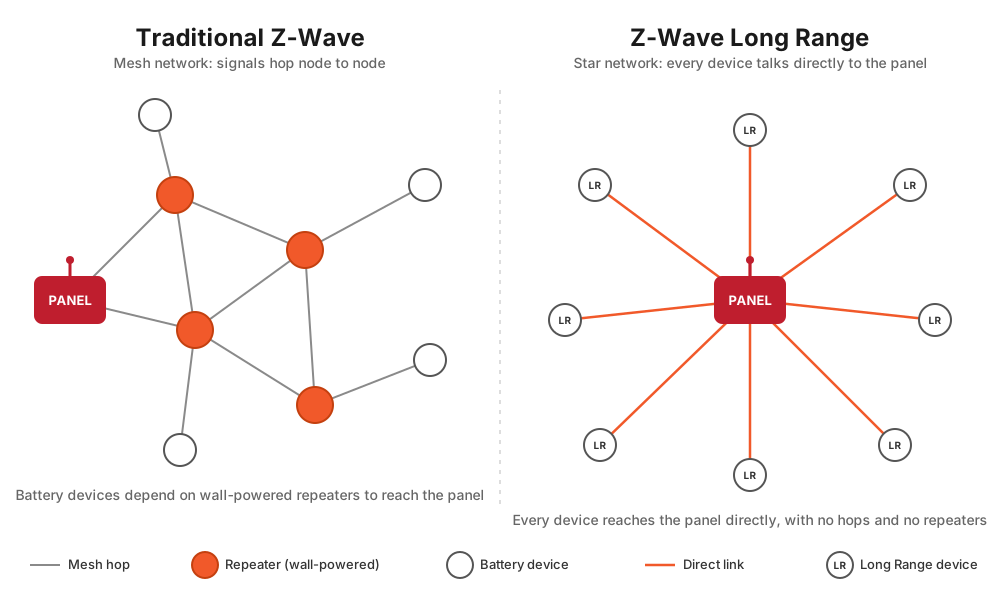
The short version of why LR deserves to be the default: traditional mesh asks you to build and maintain a network of repeaters, plan where your powered devices go, and chase down weak spots when something gets flaky. Long Range removes that entire burden. Each device simply talks straight to the panel, from much farther away, on less battery. For most homes that is not just easier, it is more reliable, which is exactly why it belongs at the default.
The Three Benefits That Actually Matter
There are several technical differences between LR and mesh, but three of them are the reasons a homeowner should care. They are far greater range, no dependence on mesh quality, and longer battery life.
1. Far greater range
Traditional Z-Wave gets its reach by relaying signals from node to node across a mesh. A signal hops from the panel through your powered devices (light switches, plug-in modules, powered thermostats) until it reaches a device too far away to talk to the panel directly. A single classic Z-Wave hop is only good for roughly 100 feet indoors, so coverage to a distant device depends on having enough powered repeaters strung out along the way. Z-Wave LR throws that model out. Each LR device talks directly to the panel with a much stronger radio link, rated up to roughly 1.5 miles line-of-sight.
That difference is most obvious at the edges of a property. A smart lock on a detached garage, a gate controller at the end of a long driveway, a water valve in a far crawlspace, a relay in a shop or outbuilding, or outdoor lighting at the far corner of a lot can all reach the panel on their own, with no chain of repeaters to install and babysit in between. Consider a family whose detached-garage door controller kept dropping off the mesh because the signal had to limp through a couple of marginal repeaters to get there. Re-added as a Long Range device, it simply talks to the panel directly and stays solid. On a large property, building a mesh out to the far reaches can mean scattering plug-in repeaters around the house just to keep a single distant device alive. Long Range makes that unnecessary.
2. No dependence on mesh quality
This is the benefit worth dwelling on, because it reframes how you should think about reliability. In a mesh, any given device’s reliability is hostage to the health of the network around it. Are there enough always-on powered devices in the right spots? Did the routing heal correctly? Did someone unplug the lamp module that was quietly carrying a route? Did a remodel, a new appliance, or a bit of interference weaken a path you were depending on? A weak spot in the mesh shows up as a device that is slow, flaky, or intermittently “not responding,” and tracking that down is one of the most frustrating parts of running a Z-Wave home.
With Long Range, a device’s reliability depends only on its own direct link to the panel, and nothing else. There is no mesh to be weak. There are no routes to heal, no repeater placement to plan, and no “the far bedroom always drops” class of problem to diagnose. The maintenance angle is just as important: with LR there is nothing to build out, and nothing to break when you move or remove a device. Add a device or pull one and you have not disturbed anyone else’s path to the panel, because there are no shared paths to disturb. Mesh is a network you build, tune, and babysit. Long Range is a set of independent point-to-point links you mostly set and forget. For a homeowner who simply wants the smart home to work, this is the single strongest argument for LR.
One technical note: LR nodes are skipped during Z-Wave Rediscovery, the process that rebuilds mesh routing, because there are no routes to optimize. That is not a downside; there are no alternate routes to heal when each device already reaches the panel directly. The reference article covers this in more detail.
3. Longer battery life
This is the benefit people care about that surprises them most, because “long range” sounds like it should drain batteries faster, not slower. The opposite is true, and it is worth understanding why, because there are two independent reasons LR devices sip power.
The first reason is dynamic power control: the radio uses only as much power as the distance actually requires. An LR device measures how much transmit power it needs to reach the panel and uses only that much, dialing up toward maximum solely when it is genuinely far away. A traditional mesh device, by contrast, fires its radio at a fixed power level on every single transmission, regardless of how close it happens to be. This is the counterintuitive heart of it: LR’s ceiling is high (that is what gives it the range), but its typical transmission is low-power, because most devices in a real home are not sitting at the edge of the property.
Picture it at two distances. Close to the panel, which is the common case, a battery-powered smart lock on the front door fifteen feet away, or a battery thermostat (one with no C-wire) on a wall a room over, barely has to whisper to be heard. On LR it transmits at very low power and the battery lasts a long time. That same device on the mesh would still fire at full fixed power every time, burning more energy than the short distance requires. So even near the panel, where you would not expect “long range” to matter at all, LR is already saving power simply by not over-transmitting. Far from the panel, a battery lock at a detached garage or a battery thermostat at the far end of the house ramps its LR radio up toward maximum, which does cost more per transmission, but it still reaches the panel directly in one shot. On a mesh that same far device often cannot reach the panel alone at all; its message has to be relayed through intermediate nodes, which brings its own cost, described next.
The second reason is the single direct hop, which avoids relay overhead, retries, and re-routing. An LR device reaches the panel in one direct transmission. A mesh device’s message often has to hop through one or more repeaters to get there, and every hop adds cost and a chance to fail. Here is where a lot of hidden battery drain lives in a mesh: at each hop the sending device waits for an acknowledgment, and if it does not get one (interference, a repeater that is busy, asleep, or was unplugged, or a route that has gone stale), it retries, sometimes several times, and may then try to re-route through a different path. Every one of those retransmissions is the battery device firing its radio again. A device sitting in a weak spot, or one whose best repeater just got unplugged, can end up retrying constantly, and you experience it as both a flaky device and a battery that dies far too soon. The contrast is stark: a healthy single LR hop is “transmit once, get the acknowledgment, go back to sleep,” whereas a struggling mesh device can be “transmit, wait, no acknowledgment, retry, retry, re-route, finally succeed,” several times the radio-on time for the very same message.
Put those two together and you get the payoff. Because LR devices spend most of their life on short, low-power, single-hop, retry-free exchanges, they can reach up to roughly ten years of battery life on a single coin cell for low-traffic devices, per the Z-Wave LR specification. For you that means a battery-powered door lock or a C-wireless thermostat goes longer between battery changes on LR than it would on the mesh. Fewer dead-battery surprises and fewer “why did this lock die again” moments.
A Quick Word on the Large Address Space
There is a fourth, more architectural advantage worth mentioning briefly. At the protocol level, Z-Wave LR uses 12-bit addressing to support up to 4,000 nodes, versus the 232-node limit of a classic mesh, which is a genuine leap. The caveat matters more than the headline, though: that 4,000 figure is a specification ceiling, not a number you will ever reach on Alarm.com, because Alarm.com hubs like Qolsys and 2GIG enforce their own, much lower per-category device limits, and those limits apply whether a device is mesh or Long Range. The Qolsys panels cap things like lights (around 80), locks (around 20), and thermostats (around 40), and Alarm.com pushes only up to 122 unique Z-Wave devices to its servers for remote control through the app. The full breakdown is in the “Device Limits on Alarm.com” section of our Z-Wave Long Range overview. The takeaway: the large address space is worth knowing about, but it is not a practical reason to pick LR over mesh. The real reasons are range, mesh-independence, and battery life.
The Exceptions: When Traditional Mesh Still Wins
Defaulting to Long Range is the right call for most devices in most homes, but it is a default, not an absolute. There are legitimate reasons to put a device on the classic mesh, and you should be able to recognize when one applies to you.
Direct association
Direct association lets one Z-Wave device control another device-to-device, directly, without the hub being involved in the moment. A scene controller or remote switch can toggle a light load instantly and locally, for example. This works on a mesh because mesh devices can talk to each other directly. Z-Wave LR devices cannot be directly associated, because every LR device talks only to the panel, so there is no device-to-device path for an association to use (and LR devices do not talk to classic mesh nodes either). So if you depend on instant, local, hub-independent device-to-device control, the device involved should be added as a traditional mesh device, not in LR mode.
Some Alarm.com-compatible devices do support direct association, including the Zooz ZEN32 Scene Controller, the Zooz ZEN34 Remote Switch, and the Zooz ZEN37 Wall Remote. These scene controllers and remotes are exactly the kind of device where direct association can matter, because their whole purpose is to control other devices, and some people want that control to be instant and to keep working even when the hub is busy. The technical consequence is firm: per Zooz, direct association requires a device-to-device path with both devices included at the same security level, which Long Range’s star topology does not provide, so direct association is not available when a device is included via Z-Wave LR. If you specifically want to use one of these controllers’ direct-association capability, enroll it (and its target device) on the classic mesh.
Here is the reassuring part: you do not need direct association for these controllers to work, and they work perfectly well in Long Range mode. Enrolled as LR, a button press travels to the panel, and the panel (through an Alarm.com scene or rule) turns on the lights or runs the action. All the functionality is there. The only practical difference is small: because the command makes a round trip through the panel instead of going straight device-to-device, there can be a slightly longer delay between pressing the wall button and the lights coming on, compared with the near-instant local response of a direct association. For most homeowners that small delay is perfectly acceptable, so even for scene controllers and remotes, Long Range is a perfectly good default. Direct association, and therefore mesh, is the right choice only for the person who specifically wants that last bit of snappiness, or wants the control to keep working locally even if the hub is unavailable. On Alarm.com, scenes and automations are usually orchestrated by the panel and the platform anyway, so most people never use direct association, which is why this is a narrow exception rather than the rule. Whether a given device is LR-capable and how it is best enrolled is worth confirming against the Surety LR compatibility list and with Surety Home.
Older devices that do not support LR mode
Plenty of existing Z-Wave devices, and not every new one either, support Long Range. LR is a capability and an enrollment mode, not just a chip generation, so an older Z-Wave Plus device, or even some newer 800-series devices that have not implemented or been validated for LR on Alarm.com, must join the classic mesh. If you are keeping older Z-Wave gear, those devices must live on the mesh. Check the Surety compatibility list for which devices are verified to work in LR mode.
When a real, healthy mesh is genuinely better
A traditional mesh shines when you have many powered devices clustered close together, the way a typical house is full of switches and plugs, all benefiting from repeating and self-healing. The mesh gets stronger and more far-reaching the more powered devices you add, and it heals and re-routes itself as conditions change. The key contrast that flows from LR’s topology: LR devices never repeat for anything, even wall-powered ones. So the old instinct to “drop in a few plug-in switches to strengthen the network” does nothing for your LR devices. If your plan depends on powered devices repeating to reach others, that is a mesh plan.
There is also one uncommon edge case where mesh wins on physics alone. Long Range needs a usable direct wireless path between the device and the panel, and in a rare situation that path can be entirely blocked, for example by a large metal wall, a metal-clad room, or similar heavy obstruction sitting directly between the two. Because every LR device must reach the panel on its own, a fully blocked direct path leaves it with nowhere to go. A mesh can route around the obstruction by hopping through other devices that do have a clear path, so it can sometimes reach a spot Long Range simply cannot. This is unusual in a typical home, where walls, floors, and furniture attenuate a signal but rarely block it outright, but it is worth knowing if you are trying to reach a device tucked behind something genuinely impenetrable.
The trap to avoid: enrolling your repeaters as LR and leaving the mesh too weak
This is worth understanding, and it is not the “all-or-nothing” warning it might sound like, because a hybrid network is perfectly fine. The worst outcome is a mesh that is too sparse to be reliable, which saddles you with the maintenance burden of a mesh and none of the robustness it is supposed to provide. Here is the specific way homeowners stumble into it while defaulting to LR: the powered switches and plugs that would have been the mesh’s repeaters get enrolled as Long Range, and because LR devices never repeat for anyone, those former repeaters no longer help your mesh devices at all. Whether that hurts depends on layout. If your handful of mesh devices sit near the panel or near other powered mesh devices, a thin mesh is fine. But a mesh device far from the panel, with all the powered devices around it enrolled as LR, can be left stranded with no good path home. The takeaway is to decide deliberately, device by device. If you have no specific reason to use mesh, default everything to LR. If you do have a reason, make sure each mesh device still has a strong enough path to the panel, either a solid direct link or enough nearby powered devices left on the mesh to repeat for it. Running both together is fine; just do not lift all your repeaters into LR and leave the remaining mesh devices stranded.
You Can Run Both on the Same Panel
None of this is an all-or-nothing decision. Z-Wave LR is backward compatible, and a single Alarm.com panel can run a traditional mesh and Long Range devices at the same time. Adding LR devices does not break your existing mesh. So a realistic, sensible setup for many homes is Long Range by default for most devices, plus a deliberately maintained mesh for the specific devices that need it: direct-association scene controllers and remotes, and older non-LR gear. The one rule is the one above: if you keep a mesh, keep it strong, with enough powered repeaters, and do not leave it half-built. A note for planning: switching a device between LR and mesh after it is enrolled means deleting it and re-adding it, because the mode is chosen at enrollment. That is a good reason to decide up front which devices belong where.
Z-Wave Long Range vs. Traditional Mesh, at a Glance
Here is the decision laid out across the factors a homeowner actually weighs.
| Factor | Z-Wave Long Range (star) | Traditional Z-Wave (mesh) |
|---|---|---|
| Topology | Star: every device talks directly to the panel | Mesh: signals hop node to node |
| Range | Up to ~1.5 miles line-of-sight, direct to panel | ~100 ft per indoor hop, extended by repeaters |
| Reliability model | Depends only on each device’s own link to the panel | Depends on overall mesh health and repeater placement |
| Battery life | Excellent: dynamic power control, up to ~10 yr on a coin cell | Good: fixed-power transmits plus relay and retry overhead |
| Repeating | No device repeats, not even powered ones | Powered devices repeat and strengthen the network |
| Direct association | Not supported | Supported, device-to-device |
| Maintenance | Little to none: nothing to build or heal | Build, tune, and heal the mesh over time |
| Enrollment | SmartStart QR scan (required for LR mode) | Traditional inclusion or SmartStart |
| Best for | Most devices, far devices, battery devices, large properties, low maintenance | Direct-association controllers, older non-LR devices, dense clusters of powered devices |
If you prefer a quick “what do I pick” cheat sheet, this covers the common situations.
| Your situation | Recommended |
|---|---|
| New LR-capable device, no direct-association need | Z-Wave Long Range |
| Device far from the panel (garage, gate, outbuilding) | Z-Wave Long Range |
| Battery-powered lock or thermostat | Z-Wave Long Range |
| Scene controller or remote you want for instant, local device-to-device control | Traditional mesh (direct association) |
| Older device that does not support LR | Traditional mesh |
| You want powered devices to repeat and extend coverage | Traditional mesh |
How You Actually Get Long Range
Two things have to be true, on both ends of the connection. First, the panel must be LR-capable: a 700-series Z-Wave chip or newer with SDK 7.15 or higher and current firmware, which in practice means a reasonably current 2GIG EDGE or Qolsys IQ Panel 4 / IQ Panel 5 on up-to-date software. The compatibility article lists the exact panels and minimum versions.
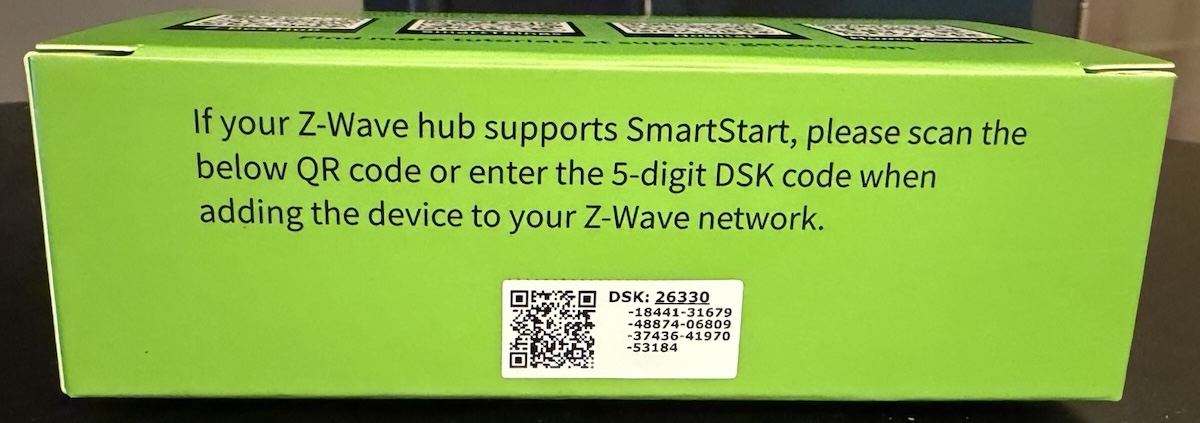
Second, the device must be LR-capable, and you must enroll it with SmartStart by scanning its QR code. This is the part people miss: even LR-capable hardware joins the classic mesh if you add it through traditional inclusion (learn mode). Long Range mode happens only via SmartStart. It is also worth clearing up a common confusion: an “800-series chip” does not automatically mean a device runs in LR mode on Alarm.com. Long Range is a mode the device has to support and be enrolled into, and Alarm.com support varies by device, so check the compatibility list. For the step-by-step, see how to enroll Z-Wave devices with SmartStart on the IQ Panel.
The Bottom Line
After all the nuance about exceptions and mesh strength, here is the simplest possible takeaway: use Z-Wave Long Range for every Z-Wave device, and you never have to think about the mesh at all. It will just work. Every device talks straight to the panel, so there is no mesh to design, no repeaters to place, nothing to heal, nothing to babysit, and nothing that breaks when you add or move a device later. You enroll each device with a QR-code scan and it connects directly to the panel.
The only reasons to deviate are… If you specifically want direct association, or you have older devices that do not support LR, put those particular devices on the mesh, and if you do, make sure that mesh is strong enough to carry them. Even scene controllers and remotes like the ZEN32, ZEN34, and ZEN37 work perfectly well in Long Range mode; you do not need direct association for them to function. The only difference is that without it the button press routes through the panel, so the lights may come on a touch later than with instant, local device-to-device control. For most people that tradeoff is negligable, which means Long Range is a fine default even there, and direct association on the mesh is an optional upgrade, not a requirement. So the headline to walk away with is the easy one: default to Long Range, use it for every Z-Wave device, and the network just takes care of itself.
Frequently Asked Questions
Should I use Z-Wave Long Range or traditional Z-Wave mesh? Default to Long Range on a modern LR-capable Alarm.com panel: far greater range, no dependence on mesh quality, and longer battery life, with almost no network to build or maintain. Use mesh only when you have a specific reason, mainly if you rely on direct association or you have older devices that do not support LR.
Do Z-Wave LR devices extend my network like mesh repeaters do? No. LR devices never repeat for other devices, even wall-powered ones. Each LR device only reaches farther because of its own strong, direct link to the panel, not because it relays for anyone else. If you specifically want a device to act as a repeater, add it to the mesh.
Why would Long Range give me better battery life if it has more range? Because of dynamic power control (an LR device transmits at only the power needed to reach the panel, ramping up only when it is truly far away) and the single direct hop (no relaying through other nodes, with the retries and acknowledgments that go with it). The result can be up to roughly ten years on a coin cell for low-traffic devices.
I want a scene controller or remote like the Zooz ZEN32, ZEN34, or ZEN37. Do I have to use mesh? No. These controllers work perfectly well in Long Range mode: a button press goes to the panel, and an Alarm.com scene or rule runs the action, so all the functionality is there. The only difference is that direct association (instant, local, device-to-device control without the hub) is not available on LR, so there can be a slightly longer delay between the button press and the lights responding. If that small delay does not bother you, LR is a fine default even for these. Choose mesh only if you specifically want the near-instant, local response of direct association, which these devices support when enrolled on the classic mesh.
Do I have to choose one for my whole house? No. A single Alarm.com panel runs both at once. A common setup is Long Range by default for most devices, plus a deliberately maintained mesh for the few devices that need direct association or do not support LR. Just do not leave the mesh half-built.
How do I make sure a device joins in LR mode? Use an LR-capable panel and an LR-capable device, and enroll it with SmartStart by scanning its QR code. Adding the same device through traditional inclusion puts it on the mesh instead. Check the Surety compatibility list to confirm a device supports LR on Alarm.com.
How do I verify that my device was actually enrolled in LR mode? This is harder than it should be. Right now Alarm.com does not surface a device’s Long Range status in the customer-facing app or website; that detail is visible on the dealer side, not to you. So the most reliable way to confirm a device is enrolled in LR mode is to ask the Surety support team to check it for you. Reach out through Surety Home support and they can confirm whether the device enrolled as a Long Range node or on the classic mesh.
