
July 8, 2026
SimpliSafe vs. Surety Home & nami: The Pro-Grade Alternative
If you are shopping for home security, you have almost certainly run into SimpliSafe. It is the name everyone knows for low cost, easy, no-contract DIY security, and it earned that reputation fairly: peel-and-stick sensors, a setup you can finish in under an hour, and no salesperson at your door. For a lot of apartments and smaller homes, it is the default choice. But if you are searching for a SimpliSafe alternative, there is now a same-price, same-ease option that most SimpliSafe shoppers have never heard of, and the interesting part is what runs underneath it.
That alternative is Surety Home. Surety sells the nami Agile Security System, an affordable, self-installed system that competes directly with SimpliSafe on price and simplicity, and runs it on Alarm.com, the professional-grade platform that licensed security dealers use to protect more than 10 million properties. Here is the short version, if you want the answer before the details: both systems install yourself in under 30 minutes, both are no-contract and month-to-month, and both start around the same hardware price. The difference is that Surety Home gives you a professional-grade platform, more advanced hardware in the nami system, and far better smart-home integration through Alarm.com, while SimpliSafe is a self-contained consumer brand with outdated hardware and very limited smart-home integration. And here is the part that surprises people: although SimpliSafe is perceived as the budget option, Surety Home’s monitoring plans actually cost less tier for tier, and they are more capable because they run on Alarm.com. You are not trading price for quality. You get both.
Three things make up the Surety Home offering, and it helps to keep them separate: nami is the affordable hardware, Alarm.com is the platform, and Surety Home is the service and support. This article compares SimpliSafe against all three together, because that is what you are actually choosing between.
Jump to a section:
- What SimpliSafe and Surety Home have in common
- SimpliSafe vs. Surety Home at a glance
- Equipment and cost up front
- Under the hood: computing power and RF hardware
- Monitoring service and monthly cost
- Motion sensing: PIR plus Wi-Fi sensing
- Smart home integration
- Connectivity and reliability
- Cameras and live response
- The platform and the company behind it
- Who should choose each
- Frequently asked questions
Apples-to-Apples: What SimpliSafe and Surety Home Have in Common
These two have more in common than you might expect, and SimpliSafe deserves credit for popularizing the model. Both are true DIY: you install them yourself in well under an hour, with no drilling, no wiring, and no technician. Both are no-contract and month-to-month, so you can cancel anytime without penalty. Both are portable, meaning you can unplug the system and take it with you when you move. Both offer cameras and professional monitoring. And both are aimed squarely at apartments, condos, townhomes, and smaller homes.
So this is not a DIY-versus-professional-install comparison, and it is not contract-versus-no-contract. Surety Home competes head-to-head with SimpliSafe using the nami hardware. From here on, the comparison is SimpliSafe against Surety Home (the nami hardware, the Alarm.com platform, and Surety’s monitoring), matched up feature for feature and price for price.
SimpliSafe vs. Surety Home at a Glance
Here is the full side-by-side before the details. Both are DIY, no-contract systems for apartments and smaller homes, so the differences come down to the platform, the hardware, and what you pay over time.
| Feature | SimpliSafe | Surety Home (nami on Alarm.com) |
|---|---|---|
| Platform | Proprietary consumer platform | Alarm.com, professional-grade |
| Starter kit price | The Foundation, $250.96 list (often discounted) | nami Alarm 15 Kit, $129 |
| Hardware | Legacy 8-bit sensors, one-way radio | Modern 32-bit sensors, two-way Thread mesh |
| Motion sensing | PIR only (one cone per sensor) | PIR plus modern Wi-Fi sensing |
| Smart-home integration | Alexa/Google voice, August locks (shallow) | Direct Alarm.com integrations; local Z-Wave hub coming (deep) |
| Cameras | Cloud motion clips, no 24/7 recording | AI Deterrence, 24/7 continuous recording, 4MP |
| Proactive deterrence | Active Guard live guard (higher tiers) | AI Deterrence and Cam Pro live guard |
| Cellular | Backup included on paid plans today | Wi-Fi today; dual-path via Pod Pro coming soon |
| Entry pro monitoring | Standard, $22.99/mo | Surety Alarm + Pro Monitoring, $19/mo |
| Video-verification monitoring | Core, $32.99/mo | Surety Protect + Pro Monitoring, $26/mo |
| Contract | None, month-to-month | None, month-to-month |
| Monitoring price history | Raised repeatedly | Never raised |
| Portable when you move | Yes | Yes |
| DIY install time | Under 30 minutes | Under 30 minutes |
Same Price, Different Machine: Equipment and Cost Up Front
The nami Alarm 15 Starter Kit is $129 and includes The Pod (a hub with a built-in siren, a Wi-Fi motion sensor, and Wi-Fi & Thread communication), a Keypad, a Sensor Plug (Wi-Fi motion sensing plus a controllable smart outlet), a PIR Motion Detector, and a Door Sensor. That is enough to protect an apartment, a small house, or a small office right out of the box. Expanding is inexpensive too: the Aware 10 Expansion Kit is $99, additional door and window sensors are $22 each, and extra PIR motion detectors are $32 each.
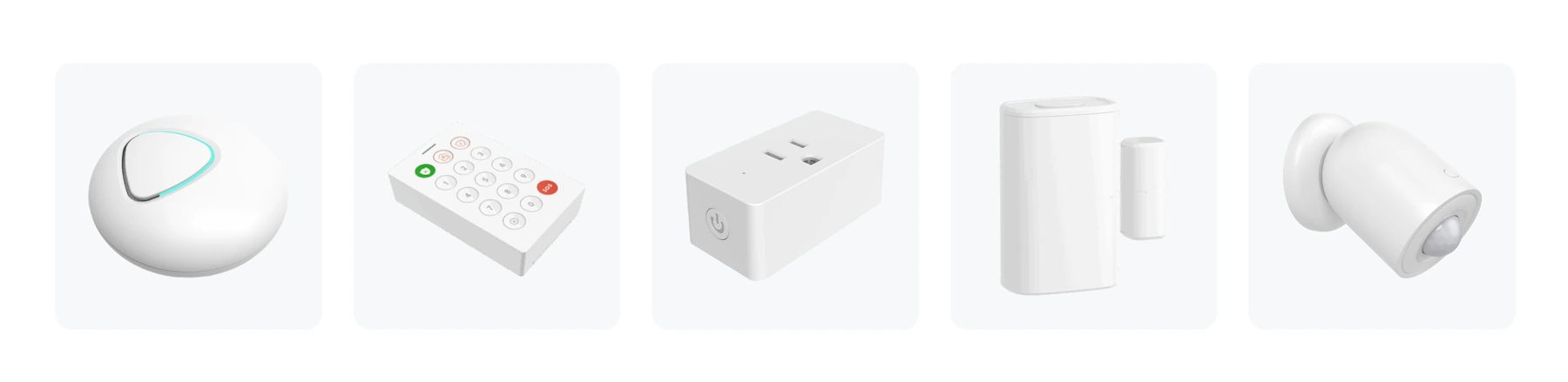
SimpliSafe’s cheapest package, The Foundation, is $250.96 at list price (base station, keypad, one entry sensor, one motion sensor), and The Starter is $282.94, according to Security.org’s SimpliSafe pricing breakdown. To be fair, SimpliSafe runs near-constant promotions, sometimes cutting prices by more than half, so its street price is often much lower than list. The takeaway on hardware price is not that Surety is dramatically lower cost, it is that for roughly the same hardware spend you get better equipment and a more capable platform behind it.
Price is only part of the story. The nami hardware is higher quality and more powerful than SimpliSafe’s, and that matters. It is more capable today and has more headroom for new features delivered over time through firmware updates, so the system can gain abilities after you buy it rather than being frozen at its launch feature set. It uses Thread, a modern low-power mesh networking standard (the same foundation behind Matter and much of the emerging smart-home world), which makes it far more forward-looking for compatibility with future devices than SimpliSafe’s proprietary, legacy sensors. And it runs on Alarm.com, so improvements flow from a platform used across millions of professional installations. With Surety Home you are buying a better-built, more capable, more future-ready system, not just a similarly priced one.
Under the Hood: Computing Power and RF Hardware
Most comparisons stop at features, but the hardware inside each system is what explains why nami can keep getting better after you buy it and SimpliSafe largely cannot. Independent security researchers at Tenable published a detailed teardown of SimpliSafe’s Gen 3 system, the same generation SimpliSafe still sells today, so its chips are a matter of public record, and nami publishes the chipsets in its product specification sheets. Here is what is actually inside each one.
SimpliSafe’s Gen 3 hardware is built for low cost and simplicity. Its base station runs a 32-bit microcontroller (a Microchip PIC32 at 50 MHz with 512 KB of flash and 64 KB of RAM) and offloads Wi-Fi and Bluetooth to a separate first-generation Espressif ESP32 module, while a Texas Instruments sub-1 GHz radio handles sensor communication. Its door and motion sensors are simpler still: an 8-bit microcontroller with 256 bytes of RAM paired with a transmit-only radio, powered by a coin cell. That transmit-only design is the detail that matters most. The sensors can send but cannot receive, which means they physically cannot accept a firmware update. Whatever they do the day you unbox them is what they will do for the life of the product.
The nami hardware sits in a different class. Its powered devices, The Pod and the Sensor Plug, each run on an Espressif ESP32-S3 (a dual-core processor at 240 MHz with 8 MB of flash and 2 MB of PSRAM) paired with a dedicated ESP32-H2 radio for Thread. Its battery-powered devices, the Keypad, PIR Motion Detector, and Door Sensor, run on a Silicon Labs EFR32MG24 (a 32-bit ARM Cortex-M33 at 78 MHz with 1.5 MB of flash and 256 KB of RAM, plus a hardware AI accelerator and a built-in security engine). The split is deliberate: the mains-powered Pod and Sensor Plug can run the hungrier, always-on ESP32-S3, while the battery-powered devices use the efficient MG24 to stretch years out of a battery, without giving up modern 32-bit processing, on-device AI, or hardware security.
| Component | SimpliSafe (Gen 3) | Surety Home (nami) |
|---|---|---|
| Hub processor | 32-bit PIC32 @ 50 MHz, 512 KB flash, 64 KB RAM | Dual-core ESP32-S3 @ 240 MHz, 8 MB flash, 2 MB PSRAM |
| Hub wireless | First-gen ESP32 (Wi-Fi/BLE) plus sub-1 GHz sensor radio | ESP32-S3 (Wi-Fi, BLE 5) plus ESP32-H2 (Thread) |
| Battery sensor processor | 8-bit MCU, 256 bytes RAM | 32-bit Cortex-M33 (EFR32MG24) @ 78 MHz, 1.5 MB flash, 256 KB RAM, AI accelerator |
| Sensor radio | Transmit-only sub-1 GHz (one-way) | Thread 802.15.4 mesh (two-way) |
| Sensor firmware updates | Not possible (transmit-only) | Over the air on every device |
| Network topology | Fixed-frequency star | Self-healing Thread mesh |
The takeaway: a single nami door sensor runs a modern 32-bit processor with a hardware AI accelerator, against a SimpliSafe sensor built on an 8-bit chip that has neither, and on top of that it carries roughly a thousand times the working memory and hundreds of times the program storage, all in a device running on the same kind of battery. And because every nami device, including the battery-powered ones, communicates two ways over a Thread mesh, all of them can receive firmware updates over the air. That is the gap between hardware that is finished the day you unbox it and hardware built to keep getting better.
Why does the processing power in something as small as a door sensor matter? Because it is the difference between a fixed appliance and a system that can grow. Headroom in memory, processing, and a two-way radio is what makes new capabilities possible after you buy, delivered as firmware updates rather than new hardware you have to purchase. The same Tenable teardown noted that SimpliSafe could not address a documented sensor-jamming weakness without shipping a new hardware revision, precisely because the endpoints cannot be updated. nami’s architecture is the opposite: because every device can receive updates and has room to spare, improvements can arrive over the air to hardware you already own.
To be fair to SimpliSafe, its minimalist design has real advantages. Because its sensors are simple and transmit-only, they sip very little power, and some go longer between battery changes: SimpliSafe’s entry and motion sensors are commonly cited at three to five years, versus four years for nami’s door sensor and two for its motion detector. That shorter figure on nami’s motion detector is the flip side of a far more capable chip that does more work and communicates two ways, not a weakness in itself. SimpliSafe’s sub-1 GHz sensor radio also travels farther through walls than the 2.4 GHz band that nami’s Thread mesh uses. What the simpler parts do not do is lower the price you pay: SimpliSafe’s sensors cost about the same as nami’s, and its motion sensor lists higher, so the buyer sees no meaningful hardware discount for the reduced capability. The point is not that SimpliSafe’s hardware is bad, it is that it is built to do one fixed job while nami’s is built with room to evolve.
That sensor radio also runs on a single fixed frequency. SimpliSafe’s sensors, keypad, and key fobs transmit in the 433 MHz band, with the Gen 3 keypad documented at 433.92 MHz in its FCC filing, and the Tenable teardown’s radio-register dump decodes to the same band. 433 MHz is one of the most widely used unlicensed frequencies in the home: garage door remotes, wireless doorbells, weather stations, remote-controlled outlets, and many inexpensive gadgets share it. In everyday use that shared traffic rarely causes a problem. Because those devices transmit in short, occasional bursts, and because a one-way sensor gets no acknowledgment and cannot even detect a collision, SimpliSafe’s sensors compensate the only way a transmit-only device can: they broadcast each event several times in quick succession, so that if one copy is lost to a brief collision, another arrives a moment later. That blind repetition is enough to ride out occasional accidental interference.
The real concern is deliberate jamming. Because the whole system listens on one narrow frequency and the sensors only transmit (they never hear an acknowledgment back), someone with an inexpensive 433 MHz transmitter, the kind sold cheaply online, can flood that frequency and block a sensor’s signal from reaching the base station during a break-in. Security researchers have demonstrated this against SimpliSafe. To its credit, SimpliSafe added jam detection that alerts you when it sees this kind of interference, and Consumer Reports, which tested DIY systems for exactly this, rated SimpliSafe “Very Good” on the strength of that detection while stressing that such attacks are uncommon and beyond most burglars. But the underlying exposure, one fixed frequency and one-way sensors, is built into the hardware and cannot be updated away.
nami’s Thread mesh is harder to jam, though no wireless system is immune, and it is worth understanding why. Three things raise the bar.
- No single choke point, which matters most. Instead of every sensor depending on one link to one base station, devices relay for each other along multiple paths that reroute around a problem, so an attacker has to defeat many links at once rather than one.
- Two-way, acknowledged communication. Every nami device confirms delivery, so messages that do not get through are retried automatically and a sustained jam can be detected quickly and reliably rather than inferred from background noise.
- A spread-spectrum radio. Thread (IEEE 802.15.4 at 2.4 GHz) spreads each transmission across a wide band, so a narrow burst of interference does far less damage than it does to a narrowband signal.
The 2.4 GHz band nami uses is busier than 433 MHz, but Thread was designed to stay reliable in a crowded band, and it also attenuates faster through walls, so a would-be jammer generally has to get closer to the home to have any effect.
The base stations are a closer contest. Both contain a dual-core Espressif processor, so this is not the lopsided gap seen at the sensor level; the difference is generation and design. The nami Pod runs on a modern ESP32-S3 that acts as both the system’s brain and its Wi-Fi and Bluetooth 5 radio, with a dedicated Thread radio alongside it, while SimpliSafe’s base pairs a first-generation ESP32 (used only for Wi-Fi and Bluetooth) with a separate 50 MHz controller for its alarm logic and a proprietary 433 MHz sensor radio. The Pod’s newer chip matters for one reason in particular: it includes AI and vector (SIMD) instructions built for on-device machine learning, plus 2 MB of PSRAM for the working memory such features need, so there is headroom set aside for smart features that can improve over time rather than only for running the alarm. SimpliSafe’s base does hold one edge the current nami Pod does not, an onboard cellular module for backup, though that gap closes with the coming Pod Pro and its Alarm.com cellular dual-path.
Here is one forward-looking example of what that headroom makes possible. Because every nami hub already contains a Thread radio alongside its Wi-Fi radio, the hardware has the ingredients to act as a Thread border router, the bridge that connects a Thread smart-home network to your home internet. Today that role is filled by devices you buy separately, like the Apple HomePod, Google Nest Hub, or Amazon Echo. Whether nami ever takes on that role is a question for future firmware, but the capability is designed into the silicon. A security hub you already own filling a job that otherwise requires a separate purchase is the kind of added value an older-generation system like SimpliSafe cannot offer.
The Real Cost Is Monthly: Monitoring Service Compared
This is where the perception of SimpliSafe as the budget option falls apart. Matched tier for tier, Surety Home’s monitoring costs less, and it is the more capable service because it runs on Alarm.com. To compare fairly, you line up SimpliSafe’s professional-monitoring plans against Surety plans that include the optional $5 per month professional-monitoring add-on.
At the entry level, Surety Alarm with professional monitoring is $19 per month, comparable to SimpliSafe Standard at $22.99 per month. Both are basic 24/7 professional monitoring with police, fire, and medical dispatch, and Surety is about $4 per month less. Step up to video verification, the tier most monitored, camera-enabled buyers land on, and SimpliSafe Core at $32.99 per month lines up against two Surety plans, both lower cost. Surety Protect with professional monitoring is $26 per month and matches Core’s headline feature, visual verification (agents can review your video when an alarm triggers), plus camera recording and AI video detection, for about $7 per month less. Core also bundles SimpliSafe’s smart-home integrations, and the Surety plan that adds smart-home control is Surety Complete, which combines that same video verification with full, direct home automation for $29 per month with professional monitoring, still about $4 less than Core and with far deeper smart-home capability. So whether you want video verification alone (Surety Protect at $26) or video verification plus smart home (Surety Complete at $29), both undercut SimpliSafe Core at $32.99. Over five years that comes to roughly $420 saved with Protect, or about $240 saved with the more capable Complete, before any equipment.
| Monitoring tier (like-for-like) | SimpliSafe | Surety Home |
|---|---|---|
| Basic 24/7 professional monitoring | Standard, $22.99/mo | Surety Alarm + Pro Monitoring, $19/mo |
| Video verification and camera recording | Core, $32.99/mo | Surety Protect + Pro Monitoring, $26/mo |
| Video verification plus full smart-home automation | Core, $32.99/mo (basic, voice-routed smart home) | Surety Complete + Pro Monitoring, $29/mo (deep, direct automation) |
| 24/7 live guard watching outdoor cameras | Pro Plus, $79.99/mo (max 3 cameras) | Surety Protect + Cam Pro, $74/mo (1 camera, +$12/additional camera) |
Pricing verified July 2026. See current Surety plans at suretyhome.com/plans.
The top tier is worth a closer look, because the answer is mixed. SimpliSafe Pro Plus adds Active Guard: when the outdoor camera’s AI detects a person on your property, a live security agent reviews the feed and can speak to them through the camera, sound the siren and spotlight, and request police dispatch, available around the clock. Surety’s equivalent is the Cam Pro add-on, which does the same thing on Surety Protect or Complete. Surety pricing is $26 for Protect with monitoring plus $48 for the first Cam Pro camera, then $12 per month for each additional camera, so one guarded camera is $74 per month, two is $86, three is $98. SimpliSafe Pro Plus is a flat $79.99 per month. So for one guarded camera Surety is lower cost, but for two or three cameras SimpliSafe’s flat rate wins on price. Here is the catch: SimpliSafe caps Active Guard at three cameras per system. To guard a fourth outdoor camera you would need to buy an entire second SimpliSafe system and a second Pro Plus plan, roughly $160 per month plus more hardware, while Surety simply adds $12 for the fourth camera ($110 per month total). Surety is the more scalable system and becomes the lower-cost option again at four or more guarded cameras, with no ceiling.
Two more things matter here beyond the numbers. SimpliSafe’s monitoring prices have risen repeatedly (the Core plan climbed to $32.99 after previous increases from around $24.99), a pattern documented by Security.org. Surety, by contrast, has never raised its monitoring prices, and its plans are month-to-month with add-ons you can turn on or off at any time, backed by a support team that knows the Alarm.com platform inside and out.
Motion Sensing: SimpliSafe Has PIR, nami Has PIR Plus Wi-Fi Sensing
SimpliSafe uses traditional passive infrared (PIR) motion sensors and fixed-frequency wireless contact sensors. This is proven, familiar technology, and it works. Its limitations are the ones inherent to PIR: it is line-of-sight, it senses heat, so it is more prone to false alarms from pets and HVAC drafts, and each sensor covers one cone, so a comparable layout needs more sensors mounted around the home.
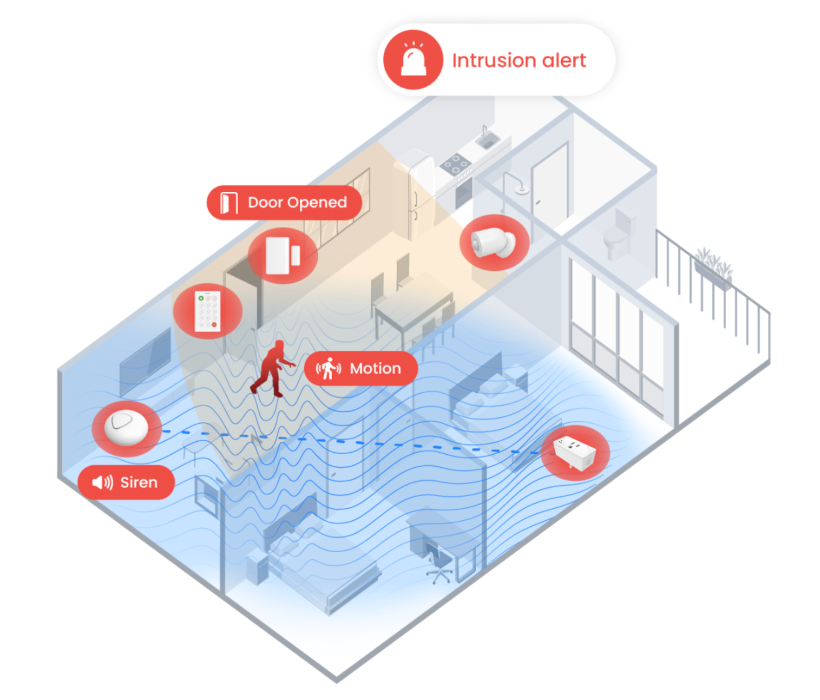
The nami system includes those same traditional PIR motion sensors, just like SimpliSafe, and then adds Wi-Fi motion sensing on top. This is the key point: nami has everything SimpliSafe has, plus a second sensing technology SimpliSafe lacks, so you can use whichever one fits each space better. The Wi-Fi sensing works through a Thread mesh: The Pod and each Sensor Plug act as Wi-Fi motion sensors, detecting the way your body disturbs the Wi-Fi radio signal as you move. Because Wi-Fi waves pass through walls and furniture and travel in all directions, a single sensing zone can cover an entire open floor plan rather than one fixed cone pointed at a door.
Compared with PIR alone, Wi-Fi sensing sees through walls for whole-room coverage, picks up subtler motion, ignores pets more reliably (it analyzes motion patterns at human scale rather than body heat), and is immune to the heat-based false triggers that plague PIR, like HVAC drafts and sunlight through a window. It is not the right tool for every spot, and Surety is candid about that: Wi-Fi sensing is best in broad open areas, while the included PIR motion detector is the better choice for tight corners, closets, stairwells, and places without a wall outlet. You pick the best tool for each room. SimpliSafe only offers the PIR half of that toolkit.
Smart Home: Voice Commands vs. Direct Integration
SimpliSafe integrates with Alexa and Google Assistant for voice commands like arming, disarming, and checking status, and it works with August smart locks. Those integrations mostly route through a voice assistant or a short device list rather than connecting directly and deeply to your devices, and several of them require an active professional-monitoring plan. SimpliSafe can handle basic voice control and a couple of device tie-ins, but it is not a deep home-automation hub.
Surety Home, through Alarm.com, connects directly to a wide range of smart-home devices: Schlage Encode locks, LiftMaster MyQ and Genie Aladdin garage doors, thermostats from Ecobee, Google Nest, Carrier, and Lennox, lighting from Lutron and Deako, and Somfy motorized shades, among others. These are real, event-driven automations managed in one app alongside your security system: arming can nudge the thermostat, an alarm can flash the lights, a specific code can unlock a specific door.
One note on cost, in fairness: this deep smart-home control is included on the Surety Home and Surety Complete plans (from $22 and $29 per month with professional monitoring), a little more than the Surety Alarm and Surety Protect plans, which do not include home automation. Even so, Surety Complete at $29, which bundles full home automation together with video verification and 24/7 monitoring, still costs less than SimpliSafe’s $32.99 Core plan, whose smart-home features are the shallow, voice-assistant-routed kind rather than direct device control.
Today, both systems reach their smart-home devices over Wi-Fi and the cloud, so Surety’s current advantage is the depth and directness of its Alarm.com integrations, not Z-Wave. That is changing. A Z-Wave hub is coming soon for nami that will unlock the full Alarm.com local smart-home experience over Z-Wave, the same deep, local device control that powers professionally installed Alarm.com systems. SimpliSafe has no answer to that: it has no Z-Wave support at all. So nami already integrates more directly than SimpliSafe now, and is on a path to widen the gap much further.
When the Internet Goes Down: Connectivity and Reliability
This is the one category where SimpliSafe currently has the edge. Every SimpliSafe paid monitoring plan includes cellular backup today, and the base station carries a 24-hour backup battery, so if your internet drops, a monitored SimpliSafe system fails over to cellular.
The nami system, as it ships today, connects over your home Wi-Fi and broadband only. It needs an active internet connection, and that is an early-access limitation, not something to gloss over. The fix is already on the way: the Pod Pro, expected later in 2026, adds Alarm.com cellular dual-path, and customers who buy the nami system now get a discounted early-adopter upgrade for $49 when it launches (the upgrade also adds a Wi-Fi sensing zone and a siren).
The architecture is where dual-path pulls ahead once it arrives. SimpliSafe’s cellular backup is a fallback: it kicks in after broadband fails, which means the system has to detect the failure, switch over, and then report, adding delay at the worst possible moment. Alarm.com cellular dual-path instead keeps a live, independent cellular connection running at all times alongside your broadband, and sends alarm signals over both paths at once. The result is faster, more reliable delivery to the monitoring center, and the gap is largest exactly when broadband is down or being tampered with, because there is no detect-and-switch lag. So SimpliSafe wins on cellular today, and Surety’s coming dual-path is the stronger design once it ships.
On pricing, the coming Pod Pro rewards buying now. A starter kit that includes cellular dual-path is expected to run around $180 to $200 once it ships, and pricing is not yet final. But buy the current $129 kit today and upgrade later for $49, and you are at about $178, below the expected bundled price and still at or below SimpliSafe’s cheapest package. Early adopters are not penalized, and likely come out slightly ahead of people who wait.
Cameras and Live Response
Both systems do cameras well enough to matter, so credit goes both ways. SimpliSafe’s cameras (Wireless Indoor $149.99, Wireless Outdoor $199.99, Video Doorbell Pro $169) record motion-triggered clips to the cloud. Its Intruder Intervention feature, on the Core plan, lets an agent view your indoor camera and speak through it during an alarm, and Active Guard, on the Pro and Pro Plus plans, has live guards proactively watch the outdoor camera’s AI detections overnight or around the clock. Active Guard is a strong service. One limitation worth noting: SimpliSafe cameras do not offer 24/7 continuous recording.
Surety Home’s Alarm.com AI cameras (Indoor Mini $79, Indoor Plus $139, Doorbell $199, Outdoor $199, Wired Outdoor $219) do on-device AI detection of people, packages, vehicles, and animals, support 24/7 continuous local recording with an SD card, and offer proactive deterrence with spotlights, strobes, and sirens. Surety matches SimpliSafe’s live-guard service directly through the Surety Cam Pro add-on ($48 per month on Surety Protect or Complete), where a live guard watches your outdoor cameras 24/7, confronts intruders through the camera, and dispatches police, the same category of service as Active Guard.
One Alarm.com capability deserves its own spotlight, because SimpliSafe has no AI-driven equivalent: AI Deterrence. Think of it as a much lower-cost, AI-powered version of the live remote-guard services (SimpliSafe’s Active Guard and Surety’s own Cam Pro). Like those services, it watches your outdoor cameras and acts proactively, engaging a would-be intruder before anyone gets inside. The difference is that instead of routing to a human guard, the AI itself responds the instant a camera detects a person where they should not be: it speaks to the intruder intelligently and in context, not a generic recorded message, calling out where they are and what they are doing so it is unmistakable they have been seen, and it can flash the camera’s spotlight and trigger a siren to drive them off. Because there is no human in the loop, it costs a fraction of a guard service: $4 per month on Surety (available on Surety Cam, Surety Protect, and Surety Complete), versus $48 per month for Cam Pro or $49.99 to $79.99 for SimpliSafe’s guard-monitored Pro and Pro Plus tiers.
The two approaches are not either/or: you can combine AI Deterrence with Surety Cam Pro so the AI engages the intruder immediately, in the split second that matters, and a live guard takes over moments later to assess the scene and dispatch police if needed. That is an instant automated response backed by a human, a layered defense SimpliSafe cannot replicate.
On camera hardware, the spec gap is concrete. SimpliSafe’s outdoor camera records at 1080p, as documented in Security.org’s SimpliSafe outdoor camera review, while Alarm.com’s outdoor and doorbell cameras run at 4MP for a meaningfully sharper image. Alarm.com cameras also add AI video analytics that distinguish people, packages, vehicles, and animals, which SimpliSafe’s cameras do not offer. Neither side is missing the live-guard capability, but the Alarm.com camera platform is higher resolution and deeper on analytics.
The Platform and the Company Behind It: Consumer vs. Professional
Step back and the real difference comes into focus. SimpliSafe is a single company that makes its own hardware, its own software, and runs its own monitoring, a self-contained consumer stack. Surety Home runs on Alarm.com, the independent professional-grade platform that thousands of licensed security dealers use, and adds its own dedicated service and support on top.
As a brand, SimpliSafe is larger than Surety Home. But Alarm.com, the platform Surety runs on, is larger than SimpliSafe in accounts monitored, protecting more than 10 million properties, though most of those are installed through Alarm.com’s large professional dealer and installer network rather than sold DIY. Surety Home is the leading DIY Alarm.com provider, giving you efficient DIY access to that professional platform without the dealer and installer markup. So choosing Surety is not choosing a smaller or lesser-known system. It is choosing DIY access to the largest and most professional monitoring platform of the three.
Who Should Choose Each: Is Surety Home the Right SimpliSafe Alternative for You?
SimpliSafe is the right pick if you want the most recognized brand name, if you specifically value SimpliSafe’s Active Guard live-guard service at two or three cameras, or if you need cellular backup working today, out of the box, and you are comfortable on a consumer platform with monitoring fees that have crept up over time.
Surety Home is the right pick if you want that same DIY ease and no-contract freedom but on the professional-grade Alarm.com platform, with the affordable nami hardware, deeper and more direct smart-home integration, both PIR and Wi-Fi sensing, lower monthly monitoring, expert human support, and a clear upgrade path to cellular dual-path, and if you are comfortable being an early adopter while the Pod Pro is still on the way. For most people cross-shopping SimpliSafe, Surety Home delivers a higher-quality, more capable system for the same or less money.
One note for the minority who want the most capable larger-home system rather than the affordable nami kit: Surety also offers premium Qolsys panels with PowerG sensors and hardwired support, covered in our SimpliSafe vs. Alarm.com comparison. For apartments and smaller homes, though, the nami system is the natural match for a SimpliSafe shopper.
Comparing other brands too? We put the same Alarm.com platform up against other popular systems in our Ring Alarm comparison, ADT comparison, and Vivint comparison.
Frequently Asked Questions
What is the best alternative to SimpliSafe? For most apartments and smaller homes, the strongest alternative is Surety Home’s nami Agile Security System. It installs yourself in under 30 minutes like SimpliSafe, costs about the same in hardware, and runs on Alarm.com, the professional platform used by licensed security dealers, with lower monthly monitoring and deeper smart-home features.
Is there a lower cost alternative to SimpliSafe? Yes. Surety Home’s nami system starts at $129 for the starter kit, below SimpliSafe’s cheapest list-price package, and its monitoring is less tier for tier: $19 per month for professional monitoring versus SimpliSafe’s $22.99 Standard plan, and $26 versus SimpliSafe’s $32.99 Core plan for video verification (or $29 for Surety Complete, which adds full smart-home automation and still costs less than Core). Over five years the video-monitoring tier alone saves roughly $420.
Is Surety Home a no-contract SimpliSafe alternative? Yes. Every Surety Home plan is month-to-month with no long-term contract and no cancellation fee, just like SimpliSafe. You can change plans or add and remove 24/7 professional monitoring at any time, and because the nami system is self-installed and plug-in, you can take it with you if you move.
Is Surety Home lower cost than SimpliSafe? Tier for tier on monitoring, yes. Surety Alarm with professional monitoring is $19 per month versus SimpliSafe Standard at $22.99, and Surety Protect with monitoring is $26 per month versus SimpliSafe Core at $32.99. Hardware runs about the same, though SimpliSafe often discounts heavily. At the top live-guard tier the pricing is mixed, but Surety scales more affordably beyond three cameras.
What is the difference between SimpliSafe and Surety Home? SimpliSafe is a self-contained consumer brand that makes its own hardware, software, and monitoring. Surety Home sells the nami hardware and runs it on Alarm.com, an independent professional-grade platform, with its own monitoring service and expert support. In practice that means a more capable platform, deeper smart-home integration, higher-quality cameras, and lower monthly cost.
Is SimpliSafe on Alarm.com? No. SimpliSafe uses its own proprietary platform and is not compatible with Alarm.com. The nami system from Surety Home runs on Alarm.com.
Can I switch from SimpliSafe to Surety Home? Yes. SimpliSafe’s hardware is proprietary and cannot be reused with Surety or Alarm.com, so you would start fresh with the nami system, but installation takes about 30 minutes. Because both are no-contract, you can keep SimpliSafe running until your nami system is set up, then cancel SimpliSafe anytime with no penalty.
Can I install Surety Home’s nami system myself like SimpliSafe? Yes. The Pod plugs into a standard outlet and connects to your Wi-Fi, the keypad mounts on a wall or sits on a surface, and the sensors attach with adhesive. There is no drilling or wiring, and most people are up and running in under 30 minutes.
Does the nami system work without internet? Not yet. The current nami system connects over your home Wi-Fi and broadband and needs an active internet connection. The Pod Pro, expected later in 2026, adds Alarm.com cellular dual-path, and customers who buy now can upgrade for $49 when it launches.
Can SimpliSafe sensors be jammed? Yes. SimpliSafe’s sensors transmit one way on a single fixed frequency in the 433 MHz band, which security researchers and Consumer Reports have shown can be blocked with inexpensive radio equipment. SimpliSafe mitigates this with jam detection that alerts you, and Consumer Reports rates it “Very Good” for catching such attempts while noting that jamming attacks are rare. The nami system is harder to jam because its Thread mesh has no single link to block: devices relay for each other over multiple two-way paths, and the network detects failed delivery automatically. No wireless system is immune, but a mesh raises the bar considerably.
How long do nami’s sensor batteries last? Per nami’s specifications, the Door Sensor lasts about four years on a single coin cell, and the PIR Motion Detector and Keypad about two years each. For comparison, SimpliSafe’s entry and motion sensors are commonly cited at three to five years. SimpliSafe’s simpler sensors can go a little longer between changes, which is the tradeoff for nami’s far more capable, two-way sensor hardware.
Does the nami system get firmware updates? Yes. Every nami device, including the battery-powered sensors and the keypad, communicates two ways over Thread, so all of them can receive firmware updates over the air, and the system can gain new capabilities after you buy it. SimpliSafe’s sensors use a transmit-only radio and cannot receive updates, so their behavior is fixed for the life of the product.
Is nami’s hardware more advanced than SimpliSafe’s? Yes. nami’s sensors run modern 32-bit processors with on-device AI acceleration, while SimpliSafe’s Gen 3 sensors use 8-bit chips with a fraction of the memory and no AI. nami’s hub is a current-generation ESP32-S3 with a dedicated Thread radio, where SimpliSafe pairs an older ESP32 with a 50 MHz controller and a proprietary 433 MHz radio. Because nami is built on Thread, the low-power mesh standard behind Matter, rather than SimpliSafe’s proprietary fixed-frequency radios, it also has far more headroom to improve over time through firmware updates.
