
July 1, 2026
The Renter’s Guide to Real Home Security (Without Losing Your Deposit)
If you rent, you may have quietly talked yourself out of real home security. Maybe you assume a serious system is something only homeowners get, or that your lease and your deposit put it out of reach. Neither is true. Renters can protect an apartment, a condo, a townhome, or a rented house like any homeowner, and you do not have to settle for a stripped-down version to do it.
You do not have to sacrifice just because you rent. You can have professional-grade security, the same capable platform that homeowners with high-end systems rely on, in a form that installs yourself in an afternoon, leaves your walls alone, does not lock you into a contract, and comes with you when you move. Below, we cover the real obstacles renters face (your lease, your deposit, and the fact that you will probably move again), how to clear each one, and where a modern option like the nami Agile Security System fits in.
Do Renters Even Need Security? Yes, and Not the Watered-Down Kind
It is easy to assume renting is lower risk, that break-ins are a homeowner’s problem. The data says otherwise. Analysis of Bureau of Justice Statistics household burglary data has long shown that burglary rates are actually higher for renter-occupied households than for owner-occupied ones. The gap has narrowed over the decades, but the takeaway stands: renting does not make you safer, so “I’m just renting” is not a good reason to skip security.
Renters are also a huge and growing share of the country. The U.S. Census Bureau’s Housing Vacancy Survey puts renter-occupied units at roughly a third of occupied housing, and Census-based analyses have found renters accounting for the large majority of recent household growth. In other words, tens of millions of households rent, and most of them face the same security concerns as anyone else: an entry door, ground-floor windows, packages, and the desire to know what is going on at home when they are not there.
Here is the part worth slowing down on. Plenty of renters already own a consumer security kit, and that is a fine place to start. Brands like Ring and SimpliSafe offer professional monitoring plans, just as we do, so this is not about whether someone is watching your home. The real difference is the platform underneath. Alarm.com is a professional-grade platform, the same technology professional security companies install in homes across the country, with deeper automation, more capable video analytics, a broader range of integrations, and the reliability and expert dealer support that come with it. Consumer kits are built on lighter, consumer-grade platforms with fewer capabilities. Until recently, renters who wanted the professional-grade platform mostly had to give it up to stay renter-friendly. That is no longer true.
The Three Obstacles for Renters, and How to Clear Them
Renters do not avoid security because they don’t want it. They avoid it because of three specific worries: the lease and the deposit, getting locked into a contract, and the fact that a rental is temporary. Each of these has a clean solution.
1. Your lease and your security deposit
Most leases let tenants install their own security devices inside the unit. What leases typically restrict are permanent changes: drilling holes, altering wiring, or anything that damages walls, doors, or windows. Outdoor cameras and anything mounted in a shared or common area are a separate matter and usually need a conversation with your landlord, because they cannot record neighbors or shared spaces. The safe path for renters is simple: choose equipment that installs without permanent modifications, and read your lease (or just ask your landlord) before you mount anything outside your own space.
The good news is that modern systems are built to go in without power tools. Door and window contacts use adhesive backing, cameras can sit on a shelf instead of a wall, and the newest sensing technology does not need mounting at all. Keep your setup damage-free and there is nothing to patch, spackle, or explain when you move out, and nothing that puts your deposit at risk.
2. Contracts and cost
The traditional security industry runs on multi-year contracts, which is a terrible fit for someone who might move in a year. This is where renters should be picky. Look for month-to-month monitoring with no long-term commitment, which is exactly what Surety Home offers: transparent pricing, no contract, and the ability to cancel or pause without penalties. You can see the specifics on the Surety Home plans page.
Monitoring can also pay for itself in a way many renters miss. A professionally monitored system can earn you a discount on renters insurance. According to consumer-insurance guidance from Policygenius, security features can lower premiums, and the larger discounts (commonly in the range of roughly 5 to 15 percent, depending on the insurer) generally require professional monitoring rather than an unmonitored, self-installed setup. Carriers like State Farm publish renters discounts along these lines. That is a concrete, recurring reason a monitored system can cost less than it looks, whichever brand you choose.
3. You are going to move
A rental is often temporary, and nobody wants to buy a system they have to abandon. The answer is to choose a self-installed, self-managed system that is portable by nature. When you move, you unplug it, pack it, and set it back up at the next place, and because your monitoring is month-to-month, it simply moves with you. There is no truck roll, no reinstallation fee, and no equipment left behind for a landlord to inherit. If you ever need a hand reconfiguring things for a new floor plan, Surety Home support can walk you through it.
What to Look for in a Renter-Friendly System
Pulling those obstacles together, a system that genuinely fits renting should check the following boxes. Use this as a quick shopping filter.
- Damage-free, minimal-mount install: adhesive sensors, shelf-placed cameras, and technology that needs little or no mounting at all.
- Self-install: you set it up yourself in an afternoon, no technician appointment.
- No long-term contract: month-to-month monitoring you can cancel or move.
- Professional monitoring: a monitoring center that can verify alarms and dispatch help, not just app notifications you have to act on yourself.
- A professional-grade platform: capable automation, video analytics, and integrations, not just the basics.
- One app for everything: arm and disarm, cameras, locks, and notifications in a single place.
- Portable: it comes with you when you move, without penalties.
Consumer kits check many of these boxes, including easy install and no-contract plans, which is why they have been popular with renters. Where they typically differ is the platform behind them: consumer-grade rather than professional-grade, with less capable automation, video analytics, and integrations. If you want the full professional-grade platform, that is the box to insist on.
A Modern Option Built for This: the nami Agile Security System
The nami Agile Security System is a good example of a platform designed for exactly this reader. It is available from Surety Home, paired with Surety’s month-to-month professional monitoring and no long-term contract, and it is priced competitively with the leading consumer DIY systems. The important difference is what is under the hood: it runs on the Alarm.com cloud, the same professional-grade platform that millions of households already trust, in the same Alarm.com app. So you get the professionally monitored experience without giving up the things that make a system work for renters.
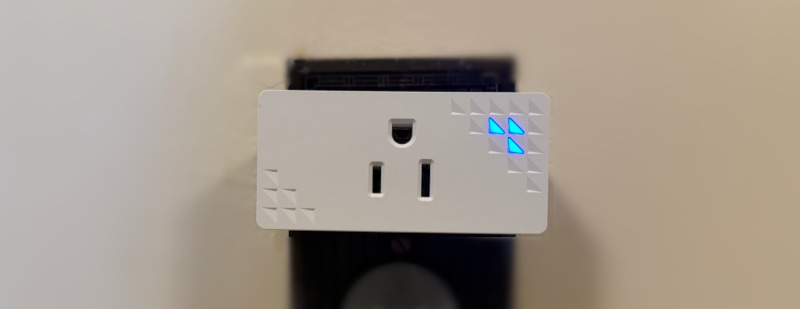
What makes it especially renter-friendly is how it senses your home. The nami system is built around Wi-Fi motion sensing, which detects movement by analyzing subtle changes in Wi-Fi signal patterns across multiple rooms, extending awareness well beyond the field of view of a single traditional motion detector. If you want the basics, we wrote an intro to Wi-Fi sensing for home security, and for the curious there is a deeper look at how Wi-Fi motion sensing works. The practical payoff for a renter is twofold. First, because one sensing zone can cover several rooms, you need fewer devices mounted around the place to begin with. Second, and this is the part renters love, the Wi-Fi sensing units simply plug into a standard wall outlet. There is no mounting at all, not even adhesive tape. Nothing to screw in, nothing to stick on, no holes and no residue, and moving out is as easy as unplugging them.
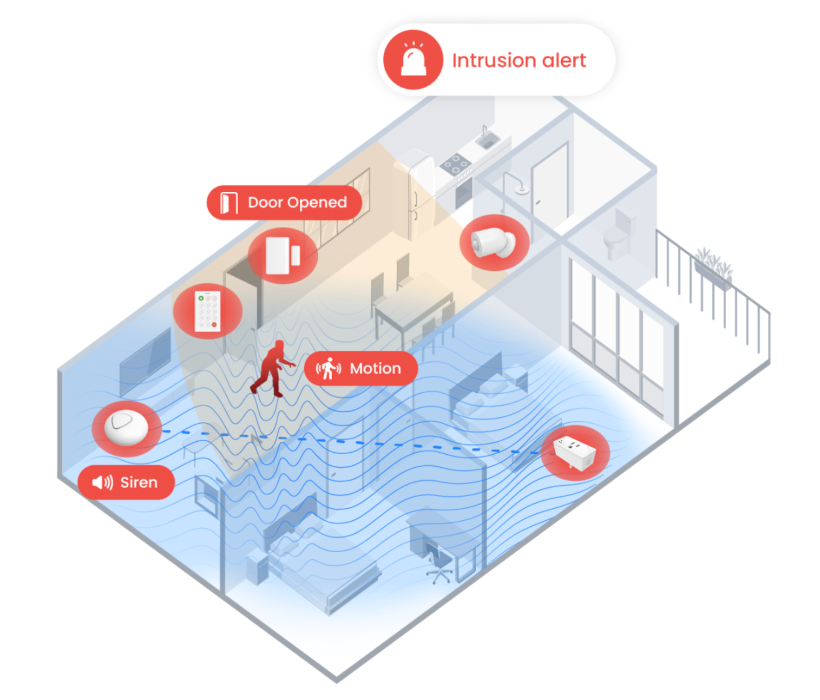
Wi-Fi sensing does not replace traditional alarm sensors, it works alongside them. The nami system supports the door and window contacts and PIR motion detectors you would expect from a professionally monitored Alarm.com system, and its fusion sensing technology combines Wi-Fi sensing with data from those traditional sensors to make smarter, system-level decisions about what is actually happening at home. It is designed to be self-installed in about an hour, which is roughly the time it takes to unbox it, place the sensors, and pair everything through the Alarm.com app.
There is a second dimension to this beyond the Alarm.com platform: the nami hardware itself is a genuinely next-generation design. It is built on Thread, the modern, open, low-power mesh networking standard that also underpins Matter and that the broader smart home industry is standardizing around. A Thread mesh is fast and self-healing, with every device helping to carry the network, which makes for a more resilient and future-ready foundation than the older, legacy radios that mainstream consumer systems still rely on. Pair that with Wi-Fi motion sensing and fusion sensing, and the result is hardware that is more advanced and more capable than typical consumer gear like Ring Alarm or SimpliSafe, which are built largely on conventional contact and motion sensors over legacy wireless. In practical terms, choosing the nami system means you are investing in current technology rather than a platform you will want to replace in a couple of years. Everything shows up in the Alarm.com app you use to arm the system, check cameras, and lock the door.
Since this is an early-access program, a couple of things are worth calling out. Today the system reports alarms over Wi-Fi and broadband only. An Alarm.com dual-path upgrade that adds cellular redundancy is planned for later this year, and early-access customers get a discounted path to it. The system also works with Alarm.com cloud-connected smart home devices right now (Schlage Encode locks, LiftMaster and Aladdin Connect garage door systems, Ecobee and Nest thermostats, and Lutron and Deako lighting) rather than local Z-Wave devices, with a Z-Wave bridge planned to enable local smart-device control. For most renters in an apartment or condo, neither limitation is a dealbreaker, but you should know where things stand. You can read the current details on the nami home page and in our early-access announcement.
For context, the nami system is not the only system Surety sells. The premium Qolsys IQ Panel with PowerG remains the better fit for larger homes and anyone who wants the most capable platform available. The nami system is the one built to make professional-grade security accessible for smaller spaces, apartments, townhomes, and renters, which is why it is the natural recommendation here.
Consumer-Grade vs Professional-Grade, Side by Side
Renters choose between a mainstream consumer system and a professional-grade one. They overlap on many of the basics renters care about, and the real difference shows up in the platform. Here is a fair comparison.
| What renters care about | Typical consumer-grade system (e.g., Ring, SimpliSafe) | Professional-grade (nami on Alarm.com, from Surety Home) |
|---|---|---|
| Damage-free, minimal-mount install | Mostly, yes | Yes, especially with plug-in Wi-Fi sensing |
| No long-term contract | Yes | Yes, month-to-month with Surety Home |
| Professional monitoring available | Yes | Yes |
| Comes with you when you move | Yes | Yes, self-installed and portable |
| May qualify for renters-insurance discount | Yes, with pro monitoring | Yes, with pro monitoring |
| Underlying platform | Consumer-grade | Professional-grade Alarm.com |
| Hardware and networking | Conventional sensors over legacy wireless | Next-generation Thread mesh with Wi-Fi and fusion sensing |
| Automation, video analytics, and integrations | More limited | Extensive and professional-grade |
| Sold and supported by | Direct-to-consumer | Authorized dealer with expert support (Surety Home) |
Cameras and Privacy When You Live Close to Others
Cameras are part of the picture for a lot of renters, and Surety sells cameras for use with the nami system. They are renter-friendly for the same reason the sensors are: a camera does not have to be wall-mounted, and in a rental it usually is not. Most indoor cameras sit on a shelf, a table, or a counter, so you get video without drilling or mounting anything. Keep the common-sense rules in mind: point cameras at your own interior space, do not record shared hallways or a neighbor’s door, and check with your landlord before mounting anything outdoors.
Privacy matters, and there are a few ways the Alarm.com approach handles it well. If you want a camera but also want control over when it can see, the Alarm.com ADC-V530 indoor camera has a built-in motorized privacy shutter that physically covers the lens so nothing is recorded. You can flip it with a button on the camera or automate it, for example closing the shutter automatically whenever you disarm and are home. If you would rather have awareness without a camera in a given room at all, Wi-Fi sensing is a natural fit: it detects motion from Wi-Fi signal changes and does not capture any images or audio, which makes it appropriate for bedrooms and other private spaces.
There is also a bigger-picture reason renters concerned about privacy tend to prefer a professional-grade platform. Alarm.com is built around professional privacy and security practices, and it has not been the subject of the highly publicized surveillance controversies that have hit some popular consumer camera brands. The most recent example is Ring. Its 2026 Super Bowl ad promoted a feature called Search Party, which uses AI to scan across Ring cameras in a neighborhood, and around the same time Ring had announced a partnership with Flock Safety, a company known for automated license-plate readers used by law enforcement, to let owners share footage with police. The combination drew heavy privacy and mass-surveillance criticism, including a public warning from the ACLU, and Ring cancelled the Flock Safety integration after the backlash. Ring says the integration never launched and no customer videos were sent to Flock, but the recurring pattern is what privacy-conscious renters are reacting to. This is not the first time, either: back in 2023 the Federal Trade Commission charged Ring over employees and contractors accessing customers’ private videos and a failure to stop hackers from taking over cameras, which ended in a settlement and consumer refunds.
None of that means any single product is perfect, and it is not a claim that Alarm.com could never have an issue. The point is narrower and fair: the consumer neighborhood-camera model keeps raising surveillance-and-privacy questions, and Alarm.com is a professional-grade platform that is not built around neighborhood-wide video sharing or law-enforcement footage networks. If privacy is high on your list, that difference is worth weighing.
The Bottom Line
Renting is not a reason to skip real home security, and it is not a reason to settle for a watered-down version of it either. The renter-friendly path is clear: choose a system that installs without damage, runs on month-to-month monitoring with no contract, is professionally monitored so help can actually be dispatched, respects your privacy, and packs up and moves with you. The nami Agile Security System hits all of those, and it does it on the professional-grade Alarm.com platform rather than a consumer-only one. If you rent and you have been waiting for security that fits your life instead of fighting it, this is worth a look.
Frequently Asked Questions
Can I install a security system if I rent? Yes. Renters can typically install their own security devices inside the unit. Leases usually restrict permanent changes like drilling and wiring, and outdoor or shared-space cameras may need landlord approval, so choose a damage-free, minimal-mount, self-install system and check your lease before mounting anything outside your own space.
Will a security system cost me my deposit? Not if you avoid permanent modifications. Systems built around technology like Wi-Fi motion sensing minimize what you install in the first place. The nami sensing units plug straight into a wall outlet with no mounting at all (no screws, no tape), cover multiple rooms without a sensor on every wall, and come off simply by unplugging, leaving no holes or adhesive marks behind.
Do I have to sign a contract? No. Surety Home offers month-to-month monitoring with no long-term contract and transparent pricing, which is exactly what you want when you may move in a year or two.
Can I take the system with me when I move? Yes. A self-installed, self-managed system like the nami Agile Security System comes with you. Unplug it, take it to the next place, and set it back up, and because your monitoring is month-to-month, it moves with you with no reinstallation fees or equipment left behind.
Is a renter’s system real security or just a gadget? It is real security. The nami system is professionally monitored on the Alarm.com cloud, the same professional-grade platform millions of households and professional security companies rely on. Consumer brands like Ring and SimpliSafe offer professional monitoring too, so the difference is not monitoring versus no monitoring; it is the capability of the platform behind it. Any professionally monitored system, including this one, also typically qualifies you for a renters-insurance discount.
Does professional-grade security cost more than a consumer system? No. The nami Agile Security System costs about the same as mainstream consumer systems like Ring or SimpliSafe. Depending on exactly which components you choose, your setup can come out slightly higher or slightly lower, but it is in the same ballpark. So you are not paying a premium to move up to a professional-grade platform and next-generation hardware, you are getting more capability for roughly the same money.
What are the limits of the nami system right now? It is an early-access program. Today it reports alarms over Wi-Fi and broadband (an Alarm.com dual-path cellular upgrade is planned, with a discounted path for early-access customers), and it works with Alarm.com cloud-connected smart home devices rather than local Z-Wave for now. See the nami home page for current details.
