
November 27, 2026
Alarm.com Now Supports Matter Smart Lighting
Alarm.com now supports Matter, the smart home standard backed by Apple, Google, Amazon and Samsung. It starts with lighting: Matter bulbs, switches, dimmers and smart plugs from Jasco and Leviton, plus Philips Hue and IKEA lights through their bridges, can now be part of your Alarm.com system. This is the first time Matter has been available on Alarm.com, and we have been waiting for this one for a while.
If you have an IQ Panel 5, IQ5 Hub or IQ5 NS, Matter lighting is included at no extra charge on our Surety Home and Surety Complete plans, and you can add devices yourself today from the Alarm.com app. If you just want to get set up, everything you need is in our Matter Devices with Alarm.com guide.

What Is Matter?
Smart home shoppers have spent years checking the fine print on the box. Many Wi-Fi bulbs and plugs worked only with their maker’s app or with one platform, such as Apple Home or Alexa, and a household that mixed brands ended up juggling apps. Matter is the industry’s answer to those walled gardens. It is an open standard from the Connectivity Standards Alliance that gives devices a common language, so a certified light works across brands and platforms instead of being locked into one.
If that sounds familiar, it should. Z-Wave made a similar promise years ago and has kept it well: it is an open standard, certified Z-Wave devices from different brands work together, and that is why it has been the backbone of Alarm.com lighting for so long. The difference is in how devices are shared and who adopted it. Z-Wave does let a device be shared between a primary controller and a secondary controller, but getting that to work in real homes has been hit or miss, and Alarm.com-compatible Z-Wave panels have never supported it well. In practice, a Z-Wave light belongs to your security panel. The biggest smart home platforms, like Apple Home and Google Home, never supported Z-Wave directly either, so your other smart home apps can only reach a Z-Wave light through Alarm.com.
What makes Matter different is who is behind it. Amazon, Apple and Google announced the project together in 2019 with the Zigbee Alliance, which has since become the Connectivity Standards Alliance. By the time Matter launched in October 2022, more than 280 companies had helped develop it, including Samsung SmartThings, Comcast and Signify, the company behind Philips Hue. Apple Home, Google Home, Amazon Alexa and Samsung SmartThings all support it today.
Matter is also more open than Z-Wave in a way that matters to the companies building devices. Its software is open source, and it runs on chips from many different semiconductor companies over standard IP networking like Wi-Fi and Thread. The 2019 announcement described Matter as IP-based, royalty-free and built with an open-source approach. Z-Wave, by contrast, had a single chip and software supplier for most of its history, first Sigma Designs and then Silicon Labs. That started to change one day after Matter was announced, when Silicon Labs and the Z-Wave Alliance announced they would open Z-Wave to other chip and software suppliers, and a second Z-Wave chipmaker, Trident IoT, launched in 2023. We doubt that timing was a coincidence. Our read is that Z-Wave opened up because Thread and Matter made it clear where the industry was heading, and that is good news for Z-Wave customers too. Both standards still require official certification before a product can carry their logo, so the difference is not in quality control. It is in how freely device makers can build with the technology.
Matter is built for sharing, and this is where it changes the most for Alarm.com users. Sharing a device between platforms is a core part of the standard rather than an afterthought, and it works on Alarm.com. One Matter device can belong to several platforms at the same time. The same lamp can be in Alarm.com, Apple Home and Alexa, and each one can control it. You do not have to pick a side.
Matter is a language, not a radio. It travels over your home Wi-Fi, over Ethernet, or over Thread, a low-power wireless mesh network designed for small devices. If you think of Matter as the letter, Wi-Fi and Thread are the envelope and the postal service. We go deeper on that in our explainer on Thread and home security. On Alarm.com today, Matter devices connect over Wi-Fi, either directly or through a Hue or IKEA bridge.
Why This Is a Big Deal for Alarm.com
Until now, lighting on an Alarm.com system mostly meant Z-Wave devices or a small number of cloud integrations. Z-Wave is excellent, but it is a specialty catalog. The lights most people already own, or pick up at a big-box store, were on the other side of the wall. Matter opens Alarm.com to that much larger world of mainstream smart lighting.
It also puts Alarm.com on the same standard the rest of the smart home is converging on. When the largest platform companies in the industry agree on one standard, the number of devices built for it grows quickly. ABI Research forecast that more than 5.5 billion Matter-compliant devices will ship between 2022 and 2030. In an ABI Research white paper published by NXP, the firm projected demand for Thread, Matter’s low-power network, growing at close to 50% a year, while its Z-Wave shipment forecast grows at about 4% a year through 2029. Those are forecasts, not counts, and the same white paper is clear that Zigbee and Z-Wave still have far larger installed bases today. But the direction is hard to ignore.
The standard is still growing, too. Matter 1.5 added cameras, closures and energy management in late 2025, and Matter 1.6 made it easier to use one device across several ecosystems in 2026. Alarm.com’s support covers lighting only for now. We expect Alarm.com to add more device types over time, and we will update our guides as it does.
The nami Agile Security System we introduced this year is built on Thread, the same low-power network that carries Matter in many homes. The nami system does not support Matter devices today, and Matter on Alarm.com currently requires an IQ5 panel, but building nami on Thread was a bet on the same open standards the rest of the smart home is adopting. A security system that works with whatever smart home devices you choose, instead of a short list of approved gear, is where we think this industry is going. Alarm.com supporting Matter is an early and important step in that direction.
What Matter Lighting Makes Possible
Once a Matter light is in Alarm.com, it behaves like any other Alarm.com lighting device. You can see whether it is on and control it from anywhere in the Alarm.com app, right next to your alarm, locks, cameras and thermostat. You can put it in automation rules, schedules and Scenes so your lighting reacts to your security system. And because it is Matter, it keeps working in Apple Home, Google Home or Alexa at the same time. A few of the setups we expect customers to build first:
Lights that answer the door. The front door opens after dark and the entry and porch lights come on before anyone reaches for a switch. It is a small convenience on a normal night and a meaningful deterrent on an abnormal one.
Every light on when the alarm goes off. If the alarm is triggered, the whole house lights up. An intruder loses the dark, and anyone responding can see what they are walking into.
One tap on the way out. An Away scene arms the system and turns off every light in the house, so nobody walks back inside to check whether the upstairs lamp is still on.
A house that looks lived in. While a family is traveling, a schedule turns living room and bedroom lamps on and off in the evening, the way they would be if someone were home.
A soft landing at night. When someone disarms the system late at night, the hallway lights come on so they are not walking into a dark house.
The Hue house. A family has spent years filling the house with Philips Hue bulbs and wants them tied to the alarm without replacing anything. Adding the Hue Bridge to Alarm.com brings every light connected to it over in one step, and the family’s existing Hue app keeps working the same as before.
The IKEA build. IKEA sells some of the most affordable smart lighting you can buy, which makes it an inexpensive way to put smart bulbs in every room instead of just a few. Connect IKEA lights to an IKEA Dirigera hub, add the hub to Alarm.com, and every one of them comes into your system at once, ready for the same rules, schedules and Scenes as any other Alarm.com light.
What Works Today
Matter support on Alarm.com requires an IQ Panel 5, IQ5 Hub or IQ5 NS on current software. No other Alarm.com panels support Matter today, including the IQ Panel 4. You also need a Surety Home or Surety Complete plan, and your Matter devices need to be on the same Wi-Fi network as your panel. Devices are added from the Alarm.com app on your phone or tablet, not the website for now, and you do it yourself in a few minutes.
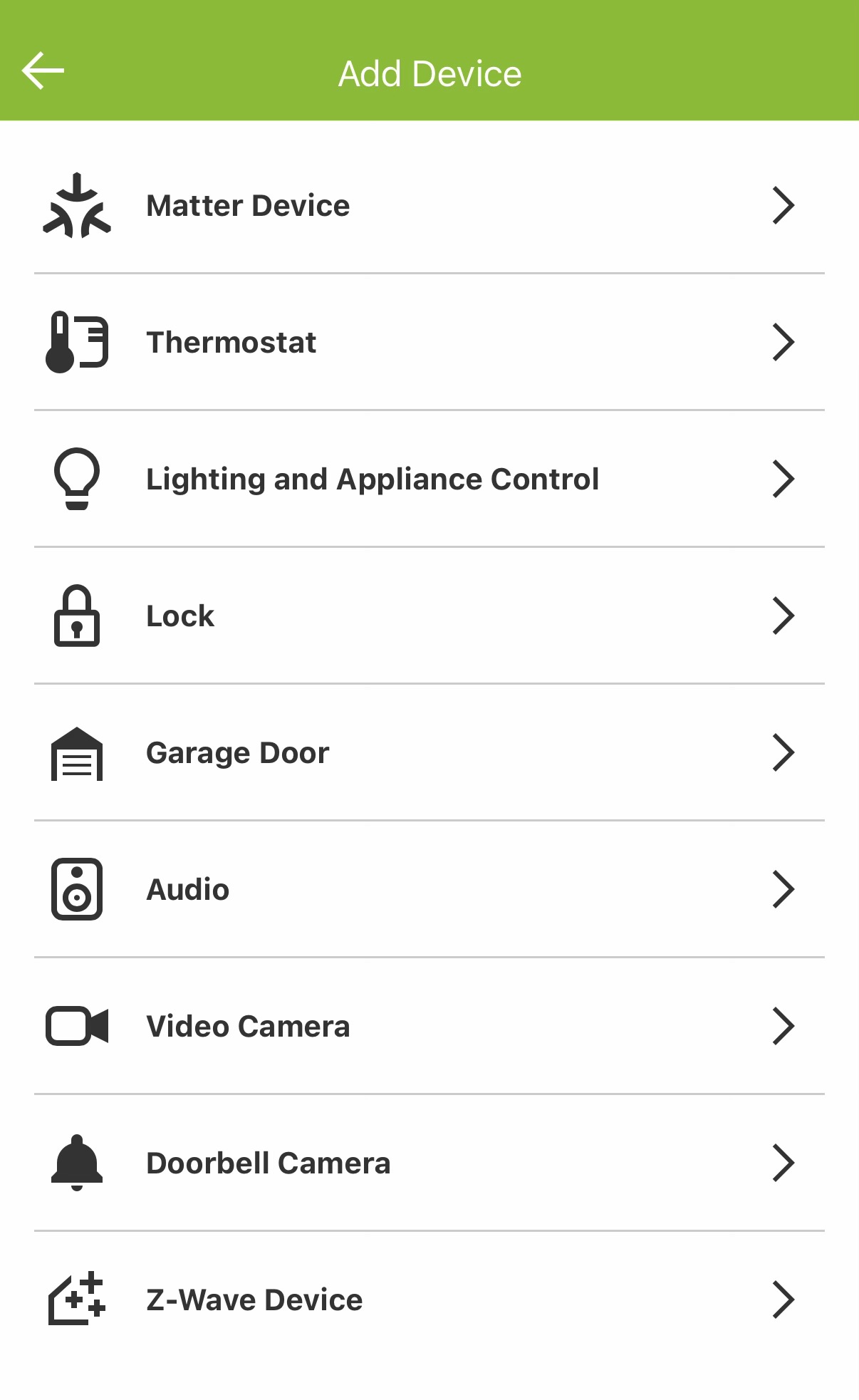
The only officially supported devices today are Wi-Fi bulbs, switches, dimmers and plugs from Jasco’s JascoPro line and Leviton’s Decora Smart Wi-Fi and Decora Evolve lines, plus Philips Hue and IKEA lights through the Hue Bridge and IKEA Dirigera hub. The bridges are the headline for a lot of homes: add the bridge, and every light connected to it appears in Alarm.com at once. Other Matter lights that connect over Wi-Fi may work too, but they are not officially supported, so there is no guarantee they will add cleanly or keep working. Alarm.com will add devices over time, so check the current model list in our Matter Devices with Alarm.com guide before you buy anything. We keep it up to date.
Matter or Z-Wave for Your Alarm.com Lights?
Most of our customers’ lighting runs on Z-Wave today, and Matter does not replace it. The two are good at different things, and plenty of homes will end up using both.
| Matter (on Alarm.com today) | Z-Wave | |
|---|---|---|
| Panels | IQ Panel 5, IQ5 Hub and IQ5 NS only | Alarm.com panels with Z-Wave, including 2GIG and IQ Panel 4 & 5 |
| How it connects | Your home Wi-Fi, on the same network as the panel, or through a Hue or IKEA bridge | A Z-Wave mesh network directly with the panel, independent of your Wi-Fi |
| Apple Home, Google Home and Alexa | Works directly with each one at the same time as Alarm.com | Not directly; voice control goes through Alarm.com’s own integrations |
| On the panel touchscreen | No, currently managed in the Alarm.com app | Yes |
| Problem reporting to Alarm.com | Not as fast or as complete as Z-Wave | Faster and more complete |
| Where the devices come from | Mainstream smart lighting brands like Philips Hue, IKEA, Leviton and Jasco | A large catalog of Alarm.com-compatible Z-Wave devices |
Matter is the better fit if you want mainstream lights that also work with Apple, Google or Amazon, or if you already own Hue or IKEA lighting and want it tied to your alarm. Z-Wave is still the stronger choice for lights you want to see and control on the panel itself, lights where you want problems reported quickly, and lights you want working regardless of what your Wi-Fi is doing. We support both, and we are happy to help you sort out which belongs where.
Things to Know Before You Buy
- Lighting only, for now. Bulbs, switches, dimmers, plugs and lighting bridges are supported. Other Matter device types are not yet.
- IQ5 panels only. If you have an IQ Panel 4 or another panel, Matter is not available on your system today.
- Wi-Fi devices and bridges. Supported devices connect over Wi-Fi or through the Hue and IKEA bridges. Do not buy a Thread-only Matter device expecting it to connect to your IQ panel.
- Every connected app has a say. Any app with access to a Matter device can remove another app’s access. If someone in the house removes Alarm.com from a light in another app, the Alarm.com rules and Scenes for that light stop working.
What It Costs and How to Get Started
Matter lighting is included at no extra charge on Surety Home and Surety Complete, which start at $17 and $24 per month, with professional monitoring available for $5 more. Like every plan we offer, they are month to month with no contract.
If you have an IQ5 panel and one of those plans, you can add your first Matter light today. Our Matter Devices with Alarm.com guide walks through adding a device, adding a Hue or IKEA bridge, and sharing your lights with Apple Home, Google Home or Alexa. If you get stuck, our team is on the support forum seven days a week.
Frequently Asked Questions
Does Alarm.com support Matter? Yes. Alarm.com supports Matter lighting devices on the IQ Panel 5, IQ5 Hub and IQ5 NS. That includes supported Wi-Fi bulbs, switches, dimmers and plugs, plus Philips Hue and IKEA lights through their bridges. Other Matter device types are not supported yet.
Will my Philips Hue lights work with Alarm.com? Yes, through the Hue Bridge. When you add the bridge to Alarm.com, all of the lights connected to it come over at once, and they keep working in the Hue app.
Can I keep using Apple Home, Google Home or Alexa? Yes. A Matter device can be controlled by several apps at the same time, so your lights can be in Alarm.com and your other smart home app together.
Does my IQ Panel 4 support Matter? No. Matter support on Alarm.com currently requires an IQ Panel 5, IQ5 Hub or IQ5 NS. Z-Wave lighting remains a great option on the IQ Panel 4.
Should I choose Matter or Z-Wave lights? Choose Matter if you want lights that also work with Apple, Google or Amazon, or you already own Hue or IKEA lighting. Choose Z-Wave if you want lights that show on the panel, report problems quickly, and do not depend on your Wi-Fi. Many homes will use both.
Does Matter cost extra? No. It is included on the Surety Home and Surety Complete plans at no additional charge.